

|
| Search | Car Forums | Gallery | Articles | Helper | Air Dried Fresh Beef Dog Food | IgorSushko.com | Corporate |
|
|||||||
| Graphic Manipulation Post and discuss different automotive art works- photoshopped, 3d graphics, and hand-drawn. |
 |
 Show Printable Version | Show Printable Version |  Subscribe to this Thread
|
|
|
Thread Tools |
|
#1
 09-18-2002, 07:41 PM
|
|||
|
|||
|
i need help for a DESKTOP
i need someone to help me out
1. cut out the dodge ram 2. post it on the blue background(but i want the background to be changed to a yellow so it will match the truck) *i hope that the s10 wont get in the way, if it does just make the ram bigger. 3. be glad you helped a friend out.  the point of this is to have a desktop(800x600) i really appreciate it. 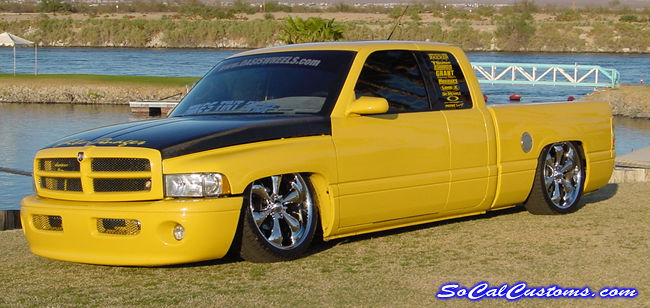  i hope the links worked 
|
|
#2
09-18-2002, 11:38 PM
|
||||
|
||||
|
the second pic/link doesn't show up
|
|
#4
09-20-2002, 09:19 PM
|
||||
|
||||
|
thanx...i c what i can do, do you want the blue flame yellow or the white background yellow
|
|
#5
09-20-2002, 10:54 PM
|
||||
|
||||
|
Hey, I wasn't really sure what you wanted yellow so I just sort of messed around with colors and came out with a couple different schemes. I know it's not the most perfect photoshop in the world but oh well.
  
__________________

|
|
#6
09-20-2002, 10:55 PM
|
||||
|
||||
|
How's this?
If you want one with better resolution, let me know, I had to save it with a lower rez in order to keep the file size under 100K, but I can e-mail you the better one. 
__________________
|
|
#7
09-20-2002, 10:56 PM
|
||||
|
||||
|
Damn, you beat me by 1 minute!
__________________
|
|
#8
09-20-2002, 10:58 PM
|
||||
|
||||
|
ci5ic, that looks good. How did you get rid of the S10 already on there so good? I'm new to this photoshop stuff so I didn't know how to do it. I just copy'd and pasted part of the background color over where the s10 was and then used that smudge tool to sort of blend it in a little bit.
__________________
|
|
#10
09-20-2002, 11:21 PM
|
||||
|
||||
|
First, what I did was used the marquee (lasso) tool to select the yellow truck, then I copied it, and pasted it into a new layer on the blue tribal flames image. Then, I positioned it over the blue truck so I could see what parts of the blue truck would need to be deleted. Then, I used the stamp tool to sample the background and paint over the blue truck... The stamp tool is the best tool in photoshop (in my opinion). Basically, you select the tool, and while holding down the alt key, click on a portion of the image. Then, you move the cursor to another location, and use it like a paint brush. Basically what happens is that it will clone the area that you clicked in over to where you are "painting" with the tool, and when you move the cursor, the sampled area changes as well... It's hard to explain, but experiment with it a little bit, and you'll see what I mean.
__________________
|
|
#11
09-21-2002, 08:07 AM
|
||||
|
||||
|
shit those pics look wicked
__________________
Formerly known as De$i Gank$ta  Current Status:100% New Project:Audi Chop Currently Working On:Nothing Current Mods: Everythings done Link:Click Here
|
| ||||||||||||||||||||||||||||||||||||||
|
POST REPLY TO THIS THREAD |
 |
|
|






