-
Grand Future Air Dried Beef Dog Food
Air Dried Dog Food | Real Beef

Carnivore Diet for Dogs

Go Back   Automotive Forums Car Chat > Automotive Art > Car Modeling
Register FAQ Community
Car Modeling Share your passion for car modeling here! Includes sub-forum for "in progress" and "completed" vehicles.
Reply Show Printable Version Show Printable Version | Subscription Subscribe to this Thread
 
Thread Tools
  #1  
Old 01-04-2010, 02:27 AM
Wolf95 Wolf95 is offline
AF Regular
 
Join Date: Oct 2009
Posts: 459
Thanks: 0
Thanked 2 Times in 2 Posts
please help!!

I tried doin the black around the clear windows and it looks like crap. I wanna redo it using the template I found. is there a thinner or paint remover i can use to remove it without ruinin the clearn plastic? I used testors flat black i believe. thanks
Reply With Quote
  #2  
Old 01-04-2010, 02:43 AM
Wolf95 Wolf95 is offline
AF Regular
Thread starter
 
Join Date: Oct 2009
Posts: 459
Thanks: 0
Thanked 2 Times in 2 Posts
Re: please help!!

I'm using this template and it's slightly too small. any hints?

http://www.spc.org.uk/misc/tamiya_r33_window_masks.pdf

thanks
Reply With Quote
  #3  
Old 01-04-2010, 06:25 AM
stevenoble's Avatar
stevenoble stevenoble is offline
AF Enthusiast
 
Join Date: Mar 2005
Posts: 3,199
Thanks: 8
Thanked 111 Times in 107 Posts
Re: please help!!

Is the Testors Black an enamel paint..?? Use Mr Muscle, or Easy Off oven cleaner to remove it without damaging the plastic. Place the entire glass section into a large plastic bag, spray in the oven cleaner, seal the bag and wait a few hours. Rinse under a cold tap and the paint should come off.
If the mask is too small you can enlarge it with a graphics program or using your printer settings before you print it off to get the right size, experiment on paper first. Once it's the correct size use it with your tape to create the mask..
__________________
Steve Noble
Reply With Quote
  #4  
Old 01-04-2010, 12:10 PM
Wolf95 Wolf95 is offline
AF Regular
Thread starter
 
Join Date: Oct 2009
Posts: 459
Thanks: 0
Thanked 2 Times in 2 Posts
Re: please help!!

Quote:
Originally Posted by stevenoble View Post
Is the Testors Black an enamel paint..?? Use Mr Muscle, or Easy Off oven cleaner to remove it without damaging the plastic. Place the entire glass section into a large plastic bag, spray in the oven cleaner, seal the bag and wait a few hours. Rinse under a cold tap and the paint should come off.
If the mask is too small you can enlarge it with a graphics program or using your printer settings before you print it off to get the right size, experiment on paper first. Once it's the correct size use it with your tape to create the mask..
actually, I used a different paint this time. it's MODEL MASTER ACRYLIC.

AND I dont have a graphics program :/
Reply With Quote
  #5  
Old 01-04-2010, 12:31 PM
stevenoble's Avatar
stevenoble stevenoble is offline
AF Enthusiast
 
Join Date: Mar 2005
Posts: 3,199
Thanks: 8
Thanked 111 Times in 107 Posts
Re: please help!!

Quote:
Originally Posted by Wolf95 View Post
actually, I used a different paint this time. it's MODEL MASTER ACRYLIC.

AND I dont have a graphics program :/
You should still be able to remove it with the oven cleaner... Check your printer, most allow you to scale what you are printing either up or down from 100% in the 'print options' page before you print. So if for instance it's a little too big, printing it at 98% will make it a touch smaller. If it's too small then print it at 103% to make it larger. Experiment with the % on paper until you find the correct size for your window masks, then once you have the size sorted you can transfer it to your masking tape and produce your 'final' mask.

If it's just the very edges of your window painting that looks bad, you may be able to 'clean' up the edges by using a permanent black marker free hand to correct them. It's probably worth a try before you strip all the paint off...
__________________
Steve Noble
Reply With Quote
  #6  
Old 01-04-2010, 02:57 PM
Wolf95 Wolf95 is offline
AF Regular
Thread starter
 
Join Date: Oct 2009
Posts: 459
Thanks: 0
Thanked 2 Times in 2 Posts
Re: please help!!

Quote:
Originally Posted by stevenoble View Post
You should still be able to remove it with the oven cleaner... Check your printer, most allow you to scale what you are printing either up or down from 100% in the 'print options' page before you print. So if for instance it's a little too big, printing it at 98% will make it a touch smaller. If it's too small then print it at 103% to make it larger. Experiment with the % on paper until you find the correct size for your window masks, then once you have the size sorted you can transfer it to your masking tape and produce your 'final' mask.

If it's just the very edges of your window painting that looks bad, you may be able to 'clean' up the edges by using a permanent black marker free hand to correct them. It's probably worth a try before you strip all the paint off...
thanks for the advice. I actually tried printin it at 102% and it didn't change much. I'll try a little more. and between the sharpie marks and paint imperfections, i'd much rather start over.

Thank you for your help
Reply With Quote
  #7  
Old 01-04-2010, 06:11 PM
Wolf95 Wolf95 is offline
AF Regular
Thread starter
 
Join Date: Oct 2009
Posts: 459
Thanks: 0
Thanked 2 Times in 2 Posts
Re: please help!!

my printer wont let me scale it. this is my print option screen. With my settings, it wont let me control the scaling. what should I do?


I tried changing some of the settings but it still wouldnt let me adjust the scaling. :/

Last edited by Wolf95; 01-04-2010 at 06:12 PM. Reason: more detail
Reply With Quote
  #8  
Old 01-04-2010, 06:50 PM
stevenoble's Avatar
stevenoble stevenoble is offline
AF Enthusiast
 
Join Date: Mar 2005
Posts: 3,199
Thanks: 8
Thanked 111 Times in 107 Posts
Re: please help!!

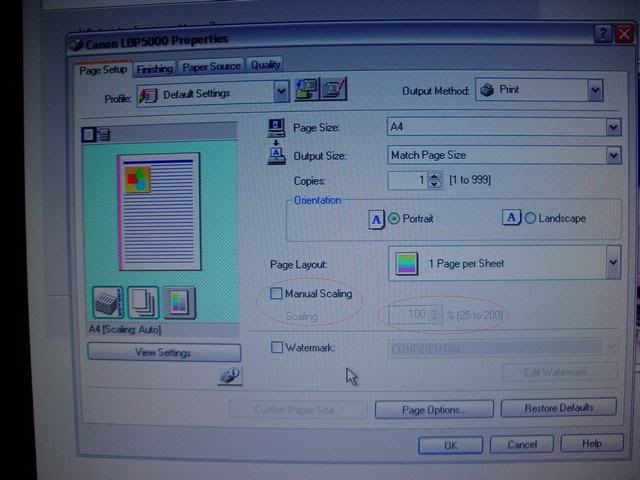
When you open the print window like on the page you show above. Look at the very top on the right of where your printer name is shown and there is a box marked 'properties' Left click 'properties' and that will open the printer set up box. You need to tick the 'manual scaling' box by left clicking it. Once you have done this you can play around with the scaling to make it bigger or smaller by changing it up or down from 100%.
__________________
Steve Noble
Reply With Quote
  #9  
Old 01-04-2010, 07:56 PM
Wolf95 Wolf95 is offline
AF Regular
Thread starter
 
Join Date: Oct 2009
Posts: 459
Thanks: 0
Thanked 2 Times in 2 Posts
Re: please help!!

Quote:
Originally Posted by stevenoble View Post
You need to tick the 'manual scaling' box by left clicking it. Once you have done this you can play around with the scaling to make it bigger or smaller by changing it up or down from 100%.
There is no manual scaling box :/
Reply With Quote
  #10  
Old 01-04-2010, 08:37 PM
MPWR's Avatar
MPWR MPWR is offline
Image Hosting Exceeded
 
Join Date: May 2003
Posts: 4,233
Thanks: 23
Thanked 97 Times in 87 Posts
Re: please help!!

I would avoid using oven cleaner on clear parts. Model Master Acryl cleans up very nicely with a quick soak in Simple Green (get it at a Home Depot or the like).
__________________
PHOTOBUCKET SUCKS
Reply With Quote
  #11  
Old 01-04-2010, 10:43 PM
Wolf95 Wolf95 is offline
AF Regular
Thread starter
 
Join Date: Oct 2009
Posts: 459
Thanks: 0
Thanked 2 Times in 2 Posts
Re: please help!!

well I have strep AND the flu so i can't go anywhere. I asked my dad to pick some up while he was out and he forgot. so i'm just cleanin it up. It'll be sufficient for my first time doin it. hopefully no one will really notice. thanks

I'd still like to figure out my printing problem tho. I'm not a complete idiot when it comes to printing stuff but i know when my computer DOESNT do something. any other tips?
Reply With Quote
  #12  
Old 01-04-2010, 11:00 PM
360spider's Avatar
360spider 360spider is offline
AF Moderator
 
Join Date: Sep 2002
Posts: 3,262
Thanks: 38
Thanked 314 Times in 241 Posts
Re: please help!!

http://www.italianhorses.net/Tutoria...asks/masks.htm
__________________
The client is not always right. - Enzo Ferrari
ItalianHorses.net
Reply With Quote
  #13  
Old 01-04-2010, 11:23 PM
Wolf95 Wolf95 is offline
AF Regular
Thread starter
 
Join Date: Oct 2009
Posts: 459
Thanks: 0
Thanked 2 Times in 2 Posts
Re: please help!!

yes, I have that link too. Thanks for bringin that up, he mentioned using an hb pencil? what's hb stand for?

I was just wantin to fix this problem for future reference?
Reply With Quote
  #14  
Old 01-04-2010, 11:29 PM
freakmech's Avatar
freakmech freakmech is offline
AF Enthusiast
 
Join Date: Jul 2003
Posts: 1,609
Thanks: 0
Thanked 0 Times in 0 Posts
Send a message via AIM to freakmech
Re: please help!!

http://www.google.com/search?q=hb+pe...ient=firefox-a
__________________
Friends dont let friends buy die-casts...
"If it can't run 24hrs., it aint sh!t...." -me



Reply With Quote
  #15  
Old 01-05-2010, 04:54 AM
stevenoble's Avatar
stevenoble stevenoble is offline
AF Enthusiast
 
Join Date: Mar 2005
Posts: 3,199
Thanks: 8
Thanked 111 Times in 107 Posts
Re: please help!!

You need to click 'properties' on the print page and then you get the page below where you can change the settings for scale.... Circled in red...
__________________
Steve Noble
Reply With Quote
 
Reply

POST REPLY TO THIS THREAD

Go Back   Automotive Forums Car Chat > Automotive Art > Car Modeling


Posting Rules
You may not post new threads
You may not post replies
You may not post attachments
You may not edit your posts

BB code is On
Smilies are On
[IMG] code is On
HTML code is Off


All times are GMT -5. The time now is 07:02 AM.

Community Participation Guidelines | How to use your User Control Panel

Powered by: vBulletin | Copyright Jelsoft Enterprises Ltd.
 
 
no new posts