

|
| Search | Car Forums | Gallery | Articles | Helper | Air Dried Fresh Beef Dog Food | IgorSushko.com | Corporate |
|
|||||||
| Car Modeling Share your passion for car modeling here! Includes sub-forum for "in progress" and "completed" vehicles. |
 |
 Show Printable Version | Show Printable Version |  Subscribe to this Thread
|
|
|
Thread Tools |
|
#1
 07-14-2009, 10:37 PM
|
||||
|
||||
|
polishing decals question
this is the first time i have had this issue...there is a huge "step" from my decal to the paint...can i polish this out? if so, what is the best method to do so? i have all three tamiya rubbing compounds, and all the fine grade sandpapers, but i do not want to ruin the decal or the finish! the gloss coat is mr. color super clear.
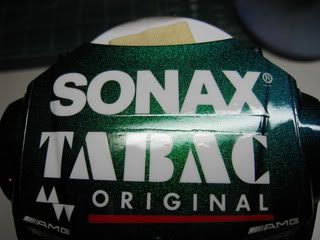 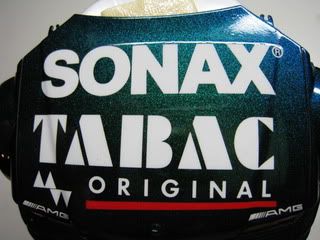 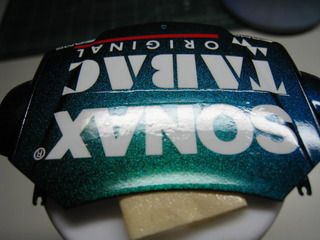 i did have to use microscale's liquid decal film for the first time to save the decals because they were old and fragile, so i am thinking perhaps i did something wrong? any help would be greatly appreciated! Stuart oh, and here is a little teaser of the rest of the body...i will post more pics when it is complete! 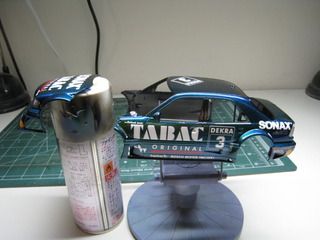 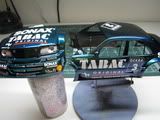

|
|
#2
07-15-2009, 12:16 AM
|
||||
|
||||
|
Re: polishing decals question
Stuart, you don't polish (let alone sand) decals. They will not stand up to any sizeable mechanical rubbing.
The only viable way to get rid of that step is to clearcoat the decals (I'd go with several coats with sanding in between) and then polishing the final flat layer. Clearcoating decals is a completely different topic. It's hard to tell from the pics, though, if you've already applied a clearcoat over the decals or not.
__________________
 Would love to resume my duties as AF's own official thread bastardizer!!!   1:29:53.435 || 207.316 || 310.596
|
|
#3
07-15-2009, 12:29 AM
|
||||
|
||||
|
Re: polishing decals question
From my experience with Microscale Liquid Film i could tell you that one coat of film over decals is invisible! Even two! What is thick is the carrier film of your decal, i suppose from Tamiya.
__________________
Tibi
|
|
#4
07-15-2009, 05:00 AM
|
||||
|
||||
|
Re: polishing decals question
Have you cleared over the top of the decals? If so very careful sanding followed by more coats and more sanding, etc, will lessen the step. That is what I usually do, but be gentle!
Some deals are just thicker than others.
|
|
#5
07-15-2009, 07:03 AM
|
||||
|
||||
|
Re: polishing decals question
Watch this video it help you with this issue. Unfortunately is in Japanese, unless you understand, anyway, the images talk by itself.
I owned one too. What color did you use for the body car? Beautiful car, good luck.
__________________
Almeida... I'm back!
|
|
#6
07-15-2009, 07:18 AM
|
||||
|
||||
|
Re: polishing decals question
From what I can see, I would advise you gently polish the surface first to get rid of the slight orange peel you have. Then apply two or so more coats of clear on top. Then polish it down until it's smooth like glass. I was just about to suggest that video too, beat me to it
 . Difference I think is in the video the decal seems a lot thinner. . Difference I think is in the video the decal seems a lot thinner.
__________________

|
|
#7
07-15-2009, 07:36 AM
|
||||
|
||||
|
Re: polishing decals question
Thanks everyone!
Quote:
Stuart
|
|
#8
07-15-2009, 08:16 AM
|
||||
|
||||
 Re: polishing decals question
Quote:
__________________
Almeida... I'm back!
|
|
#9
07-15-2009, 10:15 AM
|
||||
|
||||
|
Re: polishing decals question
Quote:
Stuart
|
|
|
POST REPLY TO THIS THREAD |
 |
|
|





