

|
| Search | Car Forums | Gallery | Articles | Helper | Air Dried Fresh Beef Dog Food | IgorSushko.com | Corporate |
|
|||||||
| Car Modeling Share your passion for car modeling here! Includes sub-forum for "in progress" and "completed" vehicles. |
 |
 Show Printable Version | Show Printable Version |  Subscribe to this Thread
|
|
|
Thread Tools |
|
#1
 01-13-2008, 09:13 PM
|
||||
|
||||
|
Tiny dots in clear coat
I've applied 4 or 5 coats of acrylic clear coat (Krylon Clear) and the clear has developed tiny dots in the finish. It is quite glossy, however, and only slightly visible under strong light at an angle. I wasn't able to even photograph it to show.
1) Is this what is referred to as fish eyes? 2) Can/will polishing take care of this? 3) Would another coat of clear take care of this? If so, wet coat or thin coat? After the last coat it look mirror smooth. I didn't notice it for a few hours or so. The clear has only been curing for about 30 hours.
__________________
Recently completed projects:      

|
|
#2
01-14-2008, 05:20 PM
|
||||
|
||||
|
Re: Tiny dots in clear coat
Anyone...? 80 views and nothing? Is it because I'm using Krylon...?
Any help would be much appreciated....
__________________
Recently completed projects:
|
|
#3
01-14-2008, 07:53 PM
|
||||
|
||||
|
Re: Tiny dots in clear coat
Can't say for sure, but if it was fish eyes you would be able to feel them as a ridge of paint usually forms around them. If you were airbrushing it I would say to check your airbrush for residual paint from a previous painting session. This would be especially worth mentioning if in your previous session you had used a metal-flake paint or metalizer.
Are you sure it's not in the basecoat? The clear gloss can enhance the appearance of inpurities in the paint underneath it. Sorry I couldn't be more of a help.
|
|
#4
01-14-2008, 08:03 PM
|
||||
|
||||
|
Re: Tiny dots in clear coat
unless you can show us what you're talking about, we're only guessing at what you're trying to describe.
__________________
AF's Guidelines Read them. __________________  Currently in the process of re-hosting my photos. If any go missing, drop me a PM.
|
|
#5
01-14-2008, 08:04 PM
|
||||
|
||||
|
Re: Tiny dots in clear coat
The clear was shot from the can and the body was cleaned before it was sprayed. The holes are too uniform to be a contaminant on the body. I'm wondering if maybe it dried too quickly and shrank?
Guess I'll find out after a polishing session... I hat polishing... 
__________________
Recently completed projects:
|
|
#6
01-14-2008, 09:15 PM
|
||||
|
||||
|
Re: Tiny dots in clear coat
Quote:
You can kind of see them if you look just outside the hotspot caused by the lightbulb: 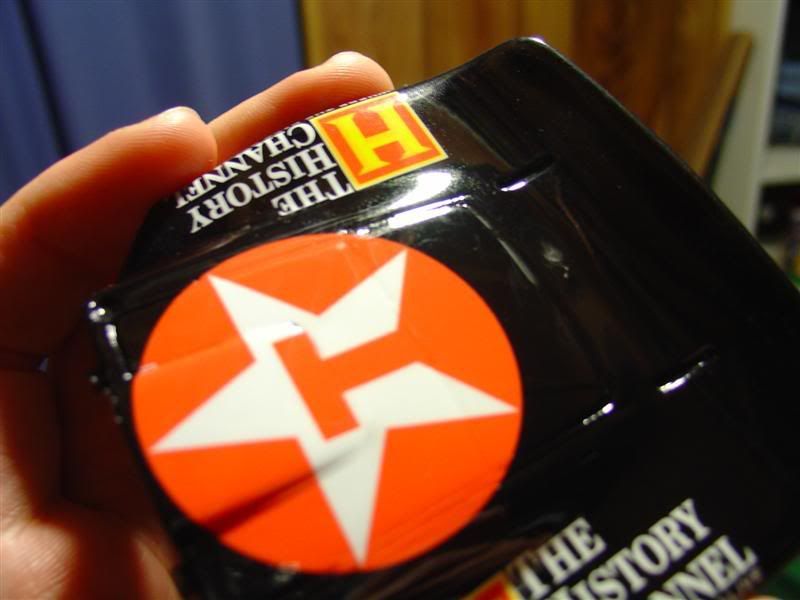  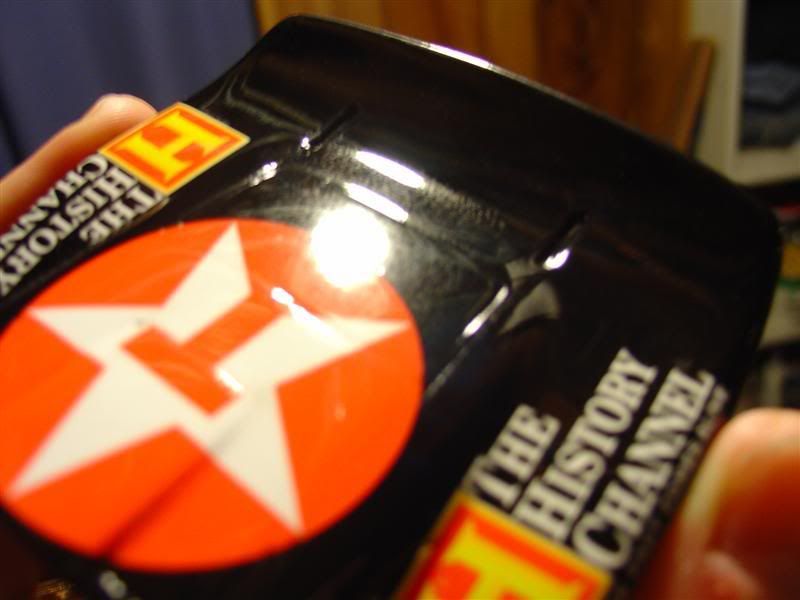
__________________
Recently completed projects:
|
|
#7
01-15-2008, 01:43 AM
|
||||
|
||||
|
Re: Tiny dots in clear coat
Have you used that particular can before? To me it looks like there is something wrong with the clear itself...maybe not mixed well enough.
As a first step try sanding and polishing and see if you still have the effect. If it is still there after that, I would sand it down and try a different can - if it works great, if not at least you tried 
__________________
Guideline for happy modeling: Practice on scrap. Always try something new. Less is more. "I have a plan so cunning, you could put a tail on it and call it a weasel" - Edmund Blackadder
|
|
#8
01-15-2008, 02:47 AM
|
||||
|
||||
|
Re: Tiny dots in clear coat
Since the result is showing over the decals as well as parts only covered with black it seems like it is not one of these myterious decal-clear coat-issues. Given the shine you have achieved as well as the smoothness of the rest of the clear coat it really seems you have had bad luck using this particular can under the particular conditions you apllied the coat on. How fast did you apply the different coats set apart? How many wet coats and how many light, misty coats did you apply? It could be that in your particular condition you might apply them too fast after another so that the underlaying clear coat has been sort of "re-touched" by the new one resulting in developing that uneven structure.
This really sucks since you have decals underneath the coat, so sanding down means dangering your decals.
__________________
Recently finished Projects:
Porsche 911 Carrera RS 3.0 Current Projects: Ferrari 250 GTO LM 1962 (chassis #3387)  
|
|
#9
01-15-2008, 05:24 AM
|
||||
|
||||
|
Re: Tiny dots in clear coat
where are those "spots" appearing?
is it on the surface of the clear, in the clear or does it look like it's on the surface of the black under the clear. Gut tells me it's a paint/clear reaction. What did you do the black surface prior to clear?
__________________
AF's Guidelines Read them. __________________ Currently in the process of re-hosting my photos. If any go missing, drop me a PM.
|
|
#10
01-15-2008, 07:27 AM
|
||||
|
||||
|
Re: Tiny dots in clear coat
I believe there was one coat of X22 that was applied months ago. This is my first time with this can, but not Krylon clear. The coats were applied about 30 to 45 minutes apart. The can says there is no recoat window. Even though it's acrylic, it is pretty strong stuff; it ate through part of one decal that wasn't fully seated in the panel lines. The dots appear only in the clear coat. The underlying black paint looks good. I'll wait a few more days for it to cure and then try wetsanding and polishing.
__________________
Recently completed projects:
|
|
#11
01-15-2008, 10:13 AM
|
||||
|
||||
|
Re: Tiny dots in clear coat
I had a similar situation over Christmas. I built this for my little nephew (he loves Death Proof and Rose McGowan).
After I applied the clear it also had small spots in the finish. As you said they're hard to photograph and didn't show until I clear coated the hood (kind of looks like dust on the surface here and only can be seen at certain angles). What it turned out to be is I had grabbed the nearest brush to apply the decals which had also been used with metalizer paint. Check your brushes to see if there's remnants of any type of metallic paint. I would have freaked if it were a "serious" model. . .  . .lol . .lolSince he's only 7 and they're barely noticeable, I can live with the specks . . lol 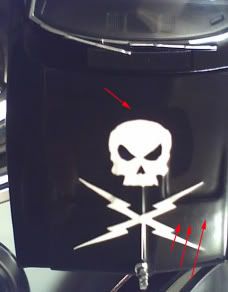
__________________
Chuck
|
|
#12
01-15-2008, 05:42 PM
|
||||
|
||||
|
Re: Tiny dots in clear coat
It looks like the propellant for the clear did not have time to fully gas out. When you spray with a can you not only have to wait for the carrier to gas out but also the CO2 (or whatever propellant) that is still saturated in the gloss. When these bubbles reach the surface they diffuse into the air but if the top coat is already setting up the gloss may no longer be soft enough to fill the pin hole left behind.
Sorry, I can't offer a fix for this other than to start over. Paint manufactures no this so the formulas are design to work fine under their recommended conditions. So, check to see if you are spraying at the right temperatures and with not too much relative humidity in the air. If this is not the case then perhaps you got an improperly mixed can of clear.
|
|
#13
01-16-2008, 12:07 AM
|
||||
|
||||
|
Re: Tiny dots in clear coat
Well, good news/bad news. I spent some time wetsanding with 2000 grit, then polishing with automotive compound and swirl remover. Turtle wax, same as I've always used. It looks fantastic and is very smooth. However, after some time it seems like the dots are coming back. And the polished half smells like it was just painted. I'm guessing this is the clear still out gassing? Its been 3 and 1/2 days, and it spent about 10 hours in my dehydrator (the oven with the light on).
Guess I'll have to wait a few more days and see how it turns out... 
__________________
Recently completed projects:
|
|
|
POST REPLY TO THIS THREAD |
 |
|
|





