-
Grand Future Air Dried Fresh Beef Dog Food
Air Dried Dog Food | Fresh Beef

Carnivore Diet for Dogs

Go Back   Automotive Forums Car Chat > Mazda > RX-7
Register FAQ Community
Reply Show Printable Version Show Printable Version | Subscription Subscribe to this Thread
 
Thread Tools
  #1  
Old 10-04-2007, 04:49 PM
olddawg9 olddawg9 is offline
AF Newbie
 
Join Date: Oct 2007
Posts: 1
Thanks: 0
Thanked 0 Times in 0 Posts
HELP FCS5 Code Blue Everything is dead

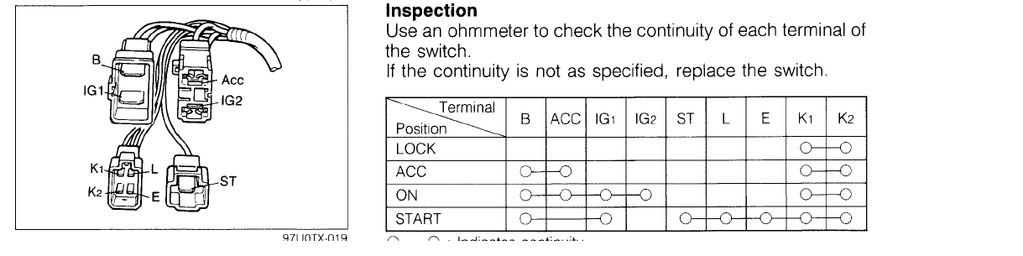
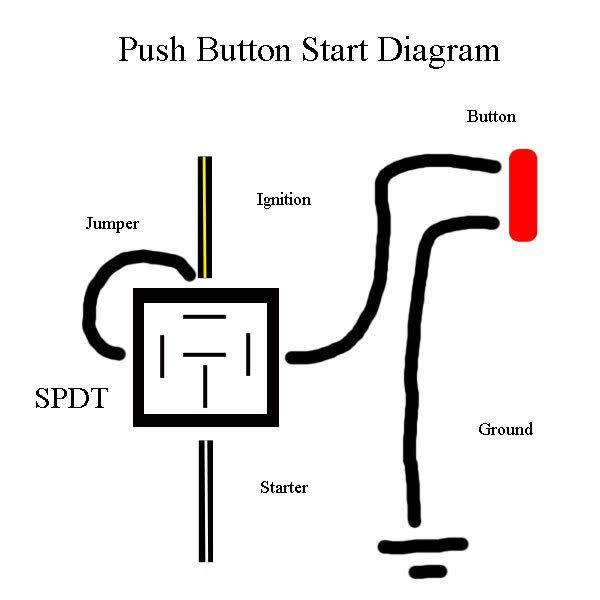
I am an idiot. I was wiring a push button start button on my 1990 vert and I tapped IGN 1 instead of IGN 2. I turned the ignition and the starter cranked for a second and then Eveything shorted out, everything. My car alarm still goes off when i reattach the neg cable but everything else is dead, no horn, no radio, no warning lights. What happend, My fuses all look ok, i replaced the main fuse anyway just in case. here is a picture of the wiring and a picture of the ignition pigtail.
Reply With Quote
  #2  
Old 10-07-2007, 10:13 PM
jcsaleen's Avatar
jcsaleen jcsaleen is offline
AF Fanatic
 
Join Date: Nov 2002
Posts: 5,596
Thanks: 3
Thanked 4 Times in 4 Posts
Re: HELP FCS5 Code Blue Everything is dead

Sorry my friend this requires some www.rx7club.com reference

I'm more about the Fd's kaoitic ways...
__________________
Quote:
"Driving a Mazda RX7 on the track for the first time was very cool ? this is a production car that most
resembles the movement of a formula car in my experience so far.
" ~ Igor
Reply With Quote
  #3  
Old 10-07-2007, 10:16 PM
mwolvin mwolvin is offline
AF Regular
 
Join Date: Oct 2005
Posts: 119
Thanks: 0
Thanked 0 Times in 0 Posts
Re: HELP FCS5 Code Blue Everything is dead

Check the fusible links-- you probably melted one.
Reply With Quote
 
Reply

POST REPLY TO THIS THREAD

Go Back   Automotive Forums Car Chat > Mazda > RX-7


Posting Rules
You may not post new threads
You may not post replies
You may not post attachments
You may not edit your posts

BB code is On
Smilies are On
[IMG] code is On
HTML code is Off


All times are GMT -5. The time now is 01:35 AM.

Community Participation Guidelines | How to use your User Control Panel

Powered by: vBulletin | Copyright Jelsoft Enterprises Ltd.
 
 
no new posts