

|
| Search | Car Forums | Gallery | Articles | Helper | Air Dried Fresh Beef Dog Food | IgorSushko.com | Corporate |
|
|||||||
| COMPLETELY off-topic Talk about anything other than cars. But you can't be mad and angry in this forum! |
 |
 Show Printable Version | Show Printable Version |  Subscribe to this Thread
|
|
|
Thread Tools |
|
#1
 07-01-2007, 08:16 PM
|
||||
|
||||
|
clocking a socket 478 Pentium 4
Am i pushing this computer too hard?
VIA P4X400 Northbridge / VIA VT8235 Southbridge socket 478 P4 400-566 MHz FSB. The FSB is adjustable inside the bios going in 1 MHz steps from 100 to 166 MHZ (quad pumped) memory 768MB 333MHz pc2700 3x256. 450 watt max power supply current processor: expected frequency 1.80 GHz (100x4) 400 MHz FSB , overclocked to (133x4) 531MHz 2.39GHz for over 2 yrs. I use Intel processor freq id utility for these figures. The Case temp (33C) 91F, CPU (24C) 73F, checked with MBM 5. Cool to the touch mem and all. I have been running it at 595MHz system bus (148x4) 2.68 GHz for the past three days. It ran it all day today without any glitches or other problems playing lots of games ect. Ive done all i can to heat it up the temp stays the same changing no more than 3 degrees. I clicked it back down to 531MHz about an hour ago because im afraid of burning it up. At 149x4 MHz windows will not load, at 150x4 the bios fails to load. That seems to be the limit i have to unplug and pull the battery to reset the bios. Has anybody else had sucessful overclocking to these extremes or am i going to far. I have another processor in case i burn this one up, is that the only damage it will do? 
|
|
#2
07-04-2007, 01:54 AM
|
||||
|
||||
|
Re: clocking a socket 478 Pentium 4
Just don't go past the motherboard's limit. If it's staying cool that's fine. My question to you: Is it really making it that much faster? I use to have an old one until I upgraded to this computer, and I used it to make a small computer for my mom to have at home and I was thoroughly impressed with it's performance with a new motherboard and a much better case. Highest temps I've seen are 29º C. That's at 3.00 GHz and I've thought about running it at 3.4 but in my old computer it never made much of a difference, and that's even with 1 gig of ram.
I might be wrong but the main thing is with those Pentium's they like to run hot, and if you're overclocking that much and not getting significant heat gains then why not, but if you're not gaining much performance, is it worth it?
__________________
Wait a minute, you mean to say a bottle of pop is bigger than your engine?? "Pain is weakness leaving your body" There is NO replacement, for displacement... 2007 Kawasaki ZX10-R S.E. 
|
|
#3
07-04-2007, 02:26 AM
|
||||
|
||||
|
Re: clocking a socket 478 Pentium 4
The temperatures seem fine, I would keep pushing it.
Have you upped the voltage to the processor as part of your overclocking? If not, try upping the voltage slightly and try 149 or 150x4 again.
__________________
Quote:
|
|
#4
07-04-2007, 09:31 AM
|
||||
|
||||
|
Re: clocking a socket 478 Pentium 4
OZ:
See thats the stupid thing, the bios on this computer allows inf. adjustability to FSB but it doesnt let me run the voltage up any higher than stock. v10 viper: Yes it made a noticable difference. It loads OS faster ect and a lot of applications that used to load the CPU usage up high dont affect it near as much. At the highest O/C its up nearly 900MHZ wich is 1/3 of the processors original speed. (EDIT its half the original spreed, 1/3 of the overall MHZ O/C) The reason the temp doesnt go up is because i cut a two holes in the side of my tower and mounted a normal size fan pointed towards the chipset, and a larger one towards the processor. I can completely unplug the processors original fan that mounts to the heatsink, and notice no temp change both in the bios monitor, and from MBM while running processes. It even seems to run better without the original fan even plugged in believe it or not. Im not sure what temp the processor gets pissed and chokes itself, but i have a feeling thats not going to happen.
|
|
#5
07-04-2007, 01:46 PM
|
||||
|
||||
|
Re: clocking a socket 478 Pentium 4
My old 478 use to run so high temps that I had to disable the Shut Down temp in the Bios, that was a result of badddd thermal paste on the CPU though. I know it was 140ºF at times and it was alright. Maybe I'll go over and start tweaking mom's computer and see if I notice much with it.

__________________
Wait a minute, you mean to say a bottle of pop is bigger than your engine?? "Pain is weakness leaving your body" There is NO replacement, for displacement... 2007 Kawasaki ZX10-R S.E.
|
|
#6
07-04-2007, 04:03 PM
|
||||
|
||||
|
Re: clocking a socket 478 Pentium 4
Heres the results i ended up with. The temp never changed no matter how i clocked it.
clocked @ 400FSB 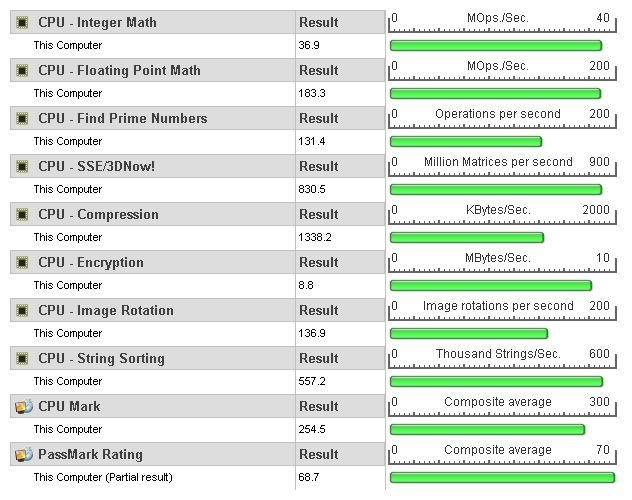 clocked @ 532FSB 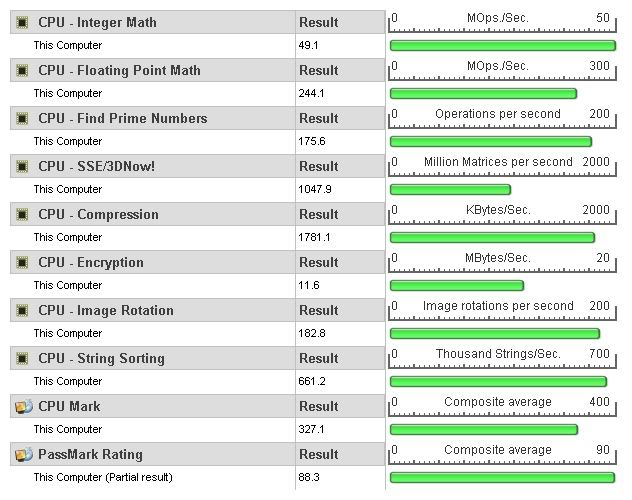 clocked @ 580FSB 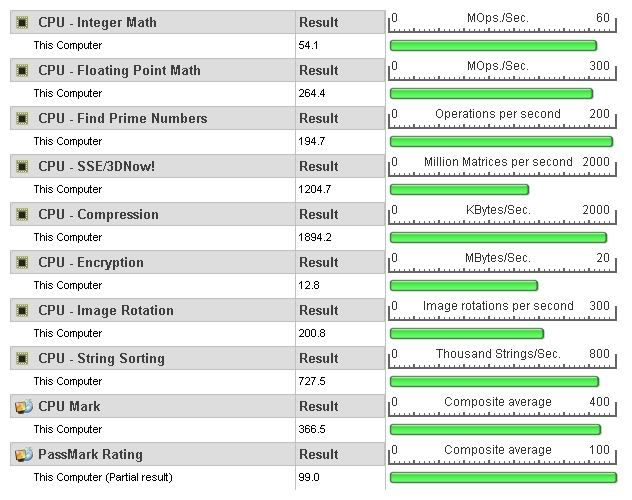 It looks to have made quite a difference. Clocking at 595FSB was too extreme, it was just before error so i decided to jump back a little and go at 580. By todays standards this probably sucks. I want a 3 gig 800FSB to play with. I bet i could clock one of those up to 4.5 gig without changing anything but the chip itself.
|
|
#7
07-04-2007, 04:52 PM
|
||||
|
||||
|
Re: clocking a socket 478 Pentium 4
Eh, push it til it breaks. Your temps look OK.
My very old Athlon 1900+ XP is running in the mid 40's C and it runs as high as 55 C on a hot day. I don't worry about it, since it's way under the max temp AMD says is safe. It has yet to even hiccup at those temps, and it's at least 4 years old. Use Arctic Silver paste and make sure you have lots of airflow through the case, which it sounds like you do. I have 120mm fans front and back on mine, front intake, rear exhaust. Like you said, if it breaks, you have another one. Have fun.
__________________
“The ultimate result of shielding men from the effects of folly is to fill the world with fools.” Herbert Spencer , English Philosopher (1820-1903) 08 HHR 95 JEEP CHEROKEE SPORT
|
|
#8
07-04-2007, 08:02 PM
|
||||
|
||||
|
Re: clocking a socket 478 Pentium 4
When was the last time you updated your BIOS? I would check if an update was available. It might let you increase the voltage.
__________________
Quote:
|
|
#9
07-06-2007, 05:24 PM
|
||||
|
||||
|
Re: clocking a socket 478 Pentium 4
Yeah it has the latest flash available. Did nothing obvious, supposedly it fixed some HT bug..
|
|
#10
07-21-2007, 01:08 PM
|
|||
|
|||
|
Re: clocking a socket 478 Pentium 4
Have you RivaTune'ed it?
|
|
#11
07-22-2007, 11:12 PM
|
||||
|
||||
|
Re: clocking a socket 478 Pentium 4
Quote:
My video is MSI G2TI (geforce 2 titanium). The software comes with OC built in. I go to the control panel/display and from there i click on "msi clock" and it allows adjustments to the video both the core clock and the memory clock. Its at 277 MHZ core clock frequency, and 457 MHZ memory clock, wich is awsome for a G2 card. Originally it was at 250 MHZ core, 401 MHZ memory wich again is good for the particular type of card it is. Most G2 cards have like 200-225 core, and anywhere from 166-333 MHZ memory clock. This one takes to OC very well, the other Nvidia cards ive had didnt clock up but maybe 5-10% before they start to show screen distortions. On my older card i had to go into the registry and turn on some of the hidden options. Heres how to do it. run : regedit/HKEY_LOCAL_MACHINE/software/NVIDIA Corporation/global/NVTweak. Right click in the window to the right of the screen and make a new DWORD value, It calles itself "New Value #1". Rename it "coolbits" and right click it and select modify, and give it a hexidecimal value of "3". Then go back into control panel/display/settings/advanced, go into the options wich has the NVIDIA icon, (its name is dependant on the actual video card you have) and in the list of options you will see "clock frequencies". Most cards will have an auto adjust feature, many of wich end up with glitches until you select manual OC and bump it up in 1 MHZ stepping until you max it out. I wonder how hot it runs, but im not too worried about that, it has a fan the size of my hand pointed right at it. When i power down and open the case both the memory and the video processor are cool to the touch like its not even been turned on. And thats less than 30 seconds after playing games wich supposedly require at least a G4 to play.
|
|
#12
07-24-2007, 02:07 AM
|
|||
|
|||
|
Re: clocking a socket 478 Pentium 4
http://www.overclockers.com/topiclis...S%20AND%20TIPS
Play around with this, then. I thought it was a GPU o/c'ing, my bad.
|
|
|
POST REPLY TO THIS THREAD |
 |
|
|









