

|
| Search | Car Forums | Gallery | Articles | Helper | Air Dried Fresh Beef Dog Food | IgorSushko.com | Corporate |
|
|||||||
| COMPLETELY off-topic Talk about anything other than cars. But you can't be mad and angry in this forum! |
 |
 Show Printable Version | Show Printable Version |  Subscribe to this Thread
|
|
|
Thread Tools |
|
#1
 02-02-2007, 12:31 AM
|
|||
|
|||
|
External hard drive
K, I solved a video card problem with all of your help and advice, so here's one more, LOL.
Since I put in the new card, and all my "issue" games run great now, I've used up the onboard 40G HD to almost it's max. I do NOT want to delete any of the games I can play now, doing the online thing multi-player thing, LOL. Thinking an external HD, say 40G+, USB 2.0 plug-in. Looking at Maxtor, and others like Western Digital, etc etc, just learning-curving. As a result, I'm not sure if I should just "empty" current HD programs to the external, or if I should go format to the external for future programs. Kinda in the dark on this, still, [learning-curve after all]. And, what should I be alert to regarding transferring files and programs from one drive to any external? Any software/driver/etc. issues to look for? Thanks for your help in advance!!!!!!!!!!! Dell 2400, upgraded to DVD+RW/CD-RW drive, RAM boosted to 768, GeForce FX5200 card pci w/ 128 Ram, if that assists. On board is 40G HD, Celeron 2.4 Ghz Step 9. 
|
|
#2
02-02-2007, 02:31 AM
|
||||
|
||||
|
Re: External hard drive
Internal hard drives are MUCH cheaper than external, and we can talk you through installing one and moving your data onto it.
If you decide to get an external I wouldn't bother with a 40gb, waste of time. LaCie make excellent external drives.
__________________
Quote:
|
|
#3
02-02-2007, 10:09 AM
|
|||
|
|||
|
Re: External hard drive
Thanks for reply, Oz. I take it then that whatever route I go, 40G would likely be too small? I can see what ya mean, if so. It didn't take any time to fill up the onboard drive, I can see that the same would happen easily to another 40G.
You suggest internal, as they are less expensive? K, cool, I'm all for saving a few $$'s, LOL. Leads to a new ? If I go internal drive, what happens to the info. on the original drive? Would I be replacing the original internal with a new one, or would I be adding another internal drive to the original? Right now, I'm just beginning to understand about adding hard drives, so any direction you can point me towards would really help me speed up my learning. I don't have much trepidation about going and putting in an internal drive, I feel pretty comfortable inside the tower now. And, please understand, this is somewhat new area [adding a hard drive] for me.
|
|
#4
02-02-2007, 10:37 AM
|
||||
|
||||
|
Re: External hard drive
You may put in 2 or more hard drives, but its easiest to put in two. You would leave the original hard drive in there, make sure the jumpers on the drive are set to master (being your primary hard drive), set the jumpers on the second hard drive to slave. Then you hook them both up. Its not to complicated ( in fact, its fairly simple). All your file on the original hard drive should be fine unless you drop it or something. I would rather have an internal HDD (hard disk drive) over and external HDD anyday.
__________________
1994 Honda Civic - D15B7 W/5 spd 2000 Olds Intrigue - 3.5 Cory
|
|
#5
02-02-2007, 11:30 AM
|
||||
|
||||
|
Re: External hard drive
I would also recommend just getting another internal HD. You can pick up a 160 GB drive for $50 if you shop around. Newegg has good prices...
Just make sure you get the right type of drive. Most likely you will need an IDE hard drive, so don't go buying a SATA drive because chances are you won't have the hookups on your old machine. All your information would still be there, but you could start installing programs and whatnot on the new one. But what I would recommend, is backing up all your information like music, documents, saved game files, etc. onto the new HD, format the 40 GB you currently have, and use that one as the slave. If you have 2 HD then, you may as well plan how you will use them. I personally would use the 40 GB slave for just music and documents and that sort of thing, and use the new (*bigger*) drive for Windows, programs, games, etc. It's all up to how you want to allocate space to what.
__________________
'92 3000gt SL Zoom Stage 1 Clutch Quote:
|
|
#6
02-02-2007, 02:39 PM
|
|||
|
|||
|
Re: External hard drive
K, thanks a LOT, guys and gals, internal it is. Yeah, I understand the slave/master deal, did that with a DVD drive, so np there.
Thanks again, great info. and direction. U folks are GREAT!!!!!!!!!
|
|
#8
02-03-2007, 11:52 AM
|
||||
|
||||
|
Re: External hard drive
Quote:
__________________
1994 Honda Civic - D15B7 W/5 spd 2000 Olds Intrigue - 3.5 Cory
|
|
#9
02-03-2007, 12:10 PM
|
|||
|
|||
|
Re: External hard drive
Well, my OS is XP Home service pack 2, if that helps.
|
|
#10
02-03-2007, 01:56 PM
|
||||
|
||||
|
Re: External hard drive
With xp you shouldn't have any problems. But there are a few things to do in xp to set up the drive once you install it. Not to hard though.
__________________
1994 Honda Civic - D15B7 W/5 spd 2000 Olds Intrigue - 3.5 Cory
|
|
#11
02-03-2007, 02:06 PM
|
||||
|
||||
|
Re: External hard drive
Quote:
__________________
'92 3000gt SL Zoom Stage 1 Clutch Quote:
|
|
#12
02-03-2007, 07:44 PM
|
||||
|
||||
|
Re: External hard drive
Quote:
Hard drives generate heat, and you need to leave a reasonable amount of room around them for airflow. Have a look inside your case near your existing hard drive, and see if there is an obvious spot for a second one. While you have your case open, check whether you have a IDE (PATA) or SATA drive - the two main kind of drives in desktop computers these days. They both take the same kind of power plugs, but one connects to the motherboard with a skinny connector and a red coloured lead, and IDE has a wide, flat ribbon type cable, usually grey in colour. Here are some pics to help you work it out: 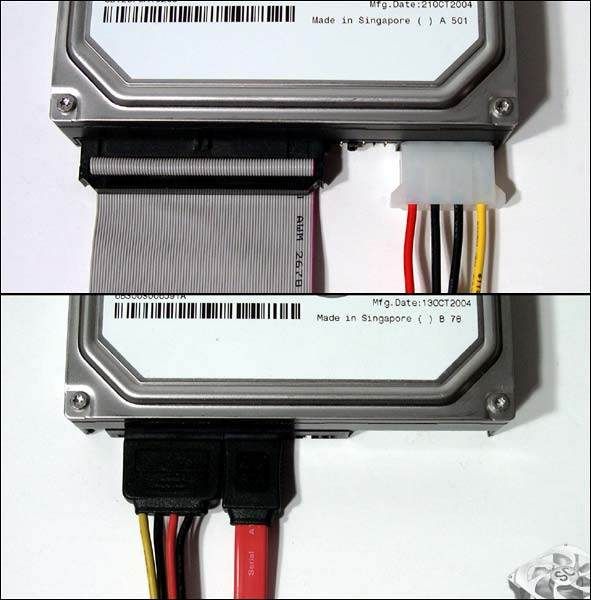 The top pic is IDE, the bottom is SATA. If there is only room for one drive in your case, you can get a larger one and copy all your data across (we can help with that), then use your existing 40GB drive in a specifically designed case as an external drive if you like. 
__________________
Quote:
|
|
#13
02-03-2007, 10:45 PM
|
||||
|
||||
|
Re: External hard drive
Quote:
__________________
1994 Honda Civic - D15B7 W/5 spd 2000 Olds Intrigue - 3.5 Cory
|
|
#14
02-03-2007, 11:48 PM
|
|||
|
|||
|
Re: External hard drive
Ayep, it's IDE. I have an open bay, not too crowded, that should work for the heat.
Wondering, though, since on-tower fan AND fan on video card run, should that be enough airflow to dissipate heat. The tower is open [not squeezed into a tight space], so there is plenty of airflow, and ambient around it is usually 70 degrees. I appreciate the thoughts and advice, in advance, you guys solved my video problems, and I'm listening to what your syaing.
|
|
#15
02-03-2007, 11:53 PM
|
||||
|
||||
|
Re: External hard drive
I would think you should be fine, mine is so crouded with video card, network card, usb card, sound card, tv/input card, and about 8 or 9 fans, But I have a fairly small case, the Xblade series case. Also, you could get a hard drive cooler if you are worried abouut the heat.
__________________
1994 Honda Civic - D15B7 W/5 spd 2000 Olds Intrigue - 3.5 Cory
|
|
|
POST REPLY TO THIS THREAD |
 |
|
|








