

|
| Search | Car Forums | Gallery | Articles | Helper | Air Dried Fresh Beef Dog Food | IgorSushko.com | Corporate |
|
|||||||
| Sketching and Drawing Sketchers and drawers in the house? |
 |
 Show Printable Version | Show Printable Version |  Subscribe to this Thread
|
|
|
Thread Tools |
|
#1
 10-13-2006, 07:26 PM
|
||||
|
||||
|
How do you fix smudges and line marks?
Okay, so I held a art show at my church two months ago and I decided to display my Gallardo in the show. Well, it was my fault for not hanging it higher up because little kids touched it and smeared it. From far away, you won't notice it, but for me, I do and so will others who actually knows art. Others will just notice it close up, but back to the point, how would you guys fix this problem? I tried erasing it and reshade the damaged area, but it doesn't come out like the original shade. It's pissing me off
 , not only that, some little brats got a hard object and scratched freakin circles around some areas. Now, those are hard for me cause there's now a groove and it will show up whenever I shade that area over. I decided to redo another one, but I ain't go the time. Help me guys. , not only that, some little brats got a hard object and scratched freakin circles around some areas. Now, those are hard for me cause there's now a groove and it will show up whenever I shade that area over. I decided to redo another one, but I ain't go the time. Help me guys.   I'll appreciate it. I'll appreciate it.  The damages. Smudged and scratches. Tried to fix it but it didn't help out much. It was actually worse before. This is 24x18" btw. Before 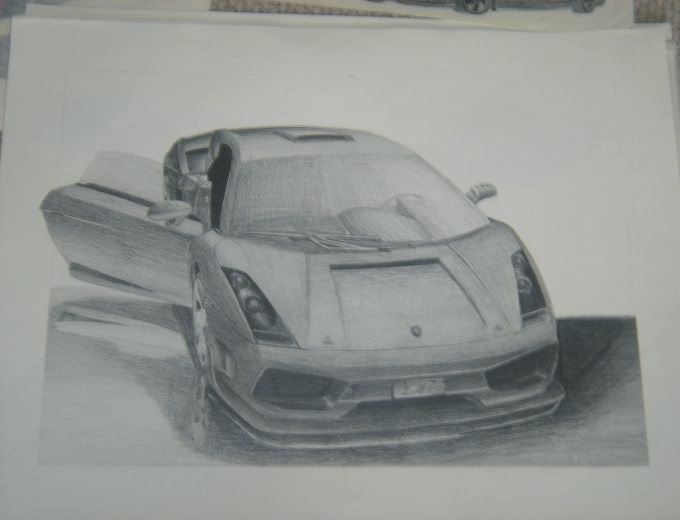 After  
__________________
 Lexus LF-A Roadster Concept with my bodykit design "Current Projects" Nismo Kure GT-R - 0% Sileighty/Onevia - 35%/25%, MCR R34 GT-R - 10%, R34 JGTC Xanavi - 30%, JGTC Raybrig NSX - 0%, 2009/2011 WRX STi - 50%/0%, D1GP Kazama S15 - 55%, Toyota Celica - 2%, Calsonic Z Super GT - 0%, Calsonic R32 GT-R Race car - 5%, C-West RX-7 - 40%, Nismo 350Z 5%, Blitz Chaser - 90%.... a lot of unfinished work. 
|
|
#2
10-13-2006, 09:05 PM
|
|||
|
|||
|
Re: How do you fix smudges and line marks?
sorry man, ive never been able to fix that problem, best thing to do is let it go cuz you'll just make it worse.
__________________
 _________D12________
R.I.P. DeSHAUN HOLTON aka BIG PROOF 1973-2006 "They say the good die Young..."
|
|
#3
10-13-2006, 09:45 PM
|
||||
|
||||
|
Re: How do you fix smudges and line marks?
Sorry man, that's really hard to fix... the paper surface probably got ruined already. If you really want to try and lighten up that smudged area, maybe take a kneaded eraser to it very lightly, then blend over it with a clean blending stick/stump. make sure it's clean or else you'll darken that area even more
Alex
__________________
www.geocities.com/stuffbyalex
|
|
#4
10-14-2006, 10:01 AM
|
|||
|
|||
|
Re: How do you fix smudges and line marks?
ehh that sucks. sorry to hear. Ive had similar problems in the past but I just left the work as it was... Look forward and do some new drawings, you'll forget about this one soon ( if you work a lot ) ..
and... dont forget to use fixative next time!!!!!!!! I was once flooded by the ppl who live above me, and so was my latest drawing which i didnt take a pic of/scan yet, my new monitor, and few other nice things... and.. my whole room was in water.. eghh lolol Jin
__________________
www.SiegArts.net
|
|
#5
10-14-2006, 12:42 PM
|
||||
|
||||
|
Re: How do you fix smudges and line marks?
Thanks for the help guys. I appreciate it. I'll try to erase it and try it over again, it's gonna take some time, but I really like this drawing because it came out great compared to my other ones. Not to mention, I'm gonna sell it off to a frame store, so I guess it needs to be fixed. =P
__________________
Lexus LF-A Roadster Concept with my bodykit design "Current Projects" Nismo Kure GT-R - 0% Sileighty/Onevia - 35%/25%, MCR R34 GT-R - 10%, R34 JGTC Xanavi - 30%, JGTC Raybrig NSX - 0%, 2009/2011 WRX STi - 50%/0%, D1GP Kazama S15 - 55%, Toyota Celica - 2%, Calsonic Z Super GT - 0%, Calsonic R32 GT-R Race car - 5%, C-West RX-7 - 40%, Nismo 350Z 5%, Blitz Chaser - 90%.... a lot of unfinished work.
|
|
#6
10-14-2006, 02:38 PM
|
|||
|
|||
|
Re: How do you fix smudges and line marks?
it really is a very good drawing, but Im sure you will do better ones very soon!
__________________
www.SiegArts.net
|
|
#7
10-18-2006, 03:17 AM
|
||||
|
||||
|
Re: How do you fix smudges and line marks?
There is 2 ways I try to use.
#1 Erase and try to match(obvious) #2 Photoshop, Downside The original will always be flawed. But flaw is in the eye of the beholder. wtf does that mean? Tried 2 help.
|
|
|
POST REPLY TO THIS THREAD |
 |
|
|








