

|
| Search | Car Forums | Gallery | Articles | Helper | Air Dried Fresh Beef Dog Food | IgorSushko.com | Corporate |
|
|||||||
| Car Audio Do you live in your car? Then you need to be able to listen to some high-quality music. |
 |
 Show Printable Version | Show Printable Version |  Subscribe to this Thread
|
|
|
Thread Tools |
|
#1
 06-11-2002, 08:24 PM
|
||||
|
||||
|
Those with Mp3 player head units, look here!
I am looking to get an MP3 deck ASAP or actually shortly (within a week).
I see most of the better decks come with wireless remotes (A must have for me)  Anyhow, how would I pop the cd in and get to track 58? Would I have to hit the FWD arrow 57 times  Or could I tap a button on the remote for a menu to pop up and go from there or what?? Or could I tap a button on the remote for a menu to pop up and go from there or what??The deck I am leaning toward at this point is the Pioneer DEH-P7400MP. Looks pretty nice, has a lot of black to go with my interior, and I am happy with the current Pioneer 8000 deck I own. 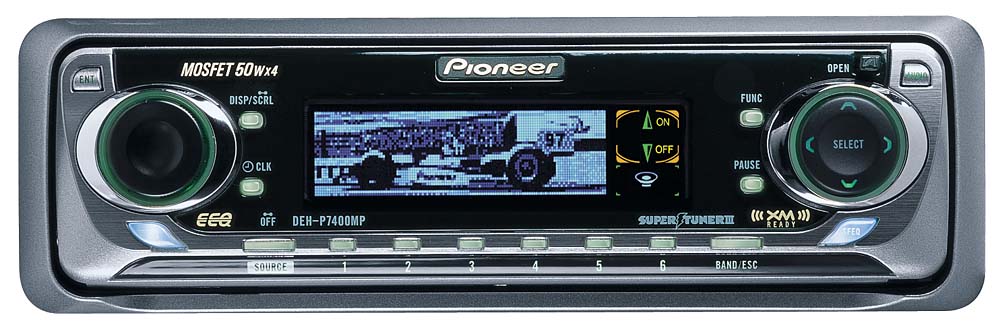 On the remote I don't see any #'s. So would you hit a button on the remote to pop up the tracks on the display?? Would it be by artist name, show the first 10 or so then allow you to scroll to the next page to see the next 10 or so and so on?? The remote: 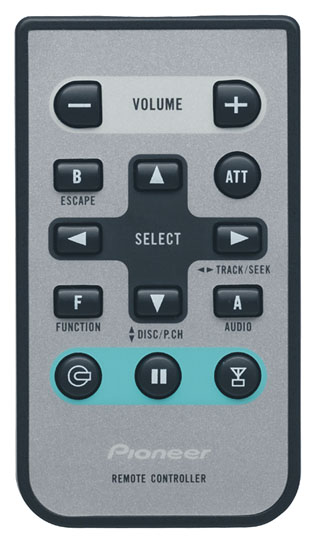 Thanks for any input on this or any other mp3 deck!! I hear Pioneer does NOT give you many character spaces to title the tracks as well. The 3 - 4 second pause between mp3s would not bother me. Also, will the 7400 play regular cds?
__________________
---------------------LX98Civic ---------------- nemesls_2000 ------- civickid77----------------  ---  --- --- -- Sleeper in the middle -- --- --- --- --- --- -- Sleeper in the middle -- --- --- ---

|
|
#2
06-11-2002, 08:36 PM
|
||||
|
||||
|
I have the Kenwood MPV 7019. On that one, I've never tried pushing the # buttons, but here's the procedure to go to a track: Up and down arrows navigate folders. Up goes to the next folder in the list, down to previous. I have my mp3 cds made so I'll have 10 or so albums or categories on a disc, and each has its own folder. The right and left arrows navigate through the tracks within a folder. Any more questions, just ask.
__________________
Just because offense is offered, does not mean you have to take it.
|
|
#3
06-12-2002, 01:09 AM
|
||||
|
||||
|
If you're using any mp3 player, organize your music in folders. It's easier to navigate through than hitting >| (next track) or |< (previous track) hundreds of times.
__________________
I/H/E, I.C.E. & other stuff... Toni/y v0.2|Nice cars thru my lens... Your first mod = HELMS MANUAL!!!  
|
|
#4
06-12-2002, 08:44 AM
|
||||
|
||||
|
Quote:
Yeh I have the KDC-X859 and it's soooo easy to navigate through your playlist if you have the CD organized right. I love mine, ran a whole party out of my car last weekend... hours and hours or music off one mix CD :ylsuper
|
|
#5
06-12-2002, 09:10 AM
|
||||
|
||||
|
Thanks for all the info!!
I take it that it's the software on the pc that determines how the folders are created? I have NERO but heard that MP3 BR (www.microft.com.br) is a hell of a lot easier to use and to create / edit the ID3 tags. Thanks again!
__________________
---------------------LX98Civic ---------------- nemesls_2000 ------- civickid77---------------- --- --- --- -- Sleeper in the middle -- --- --- ---
|
|
#6
06-12-2002, 12:32 PM
|
|||
|
|||
|
You can toggle the titles of the songs off and on. The title of the song will be the filename. You can just rename the file instead of changing the ID3 tag, which is a hell of alot easier. When I first got mine I burnt a cd with 127 songs on it. Now I never burn more than 30 jams to a cd, it gets to hard to remember what is on it, and where it is on it even with folders.
__________________
"You never heard of a mind as perverted as mine." -Eminem
|
|
#7
06-12-2002, 03:05 PM
|
|||
|
|||
|
Quote:
btw, i have the aiwa cdmp3(kinda ghetto, but it was the ONLY one at the time)
|
|
#8
06-13-2002, 01:31 AM
|
||||
|
||||
|
Yup, and with mine, it can read the ID3 tag, the filename, the folder name, the disc name, and the display does 67 colors!!
I have 8 Smashing Pumpkins albums and all the singles/b-sides/soundtrack songs on one disc, which is a million times better than switching discs all the time, which endangers your life if you're driving.
__________________
Just because offense is offered, does not mean you have to take it.
|
|
#9
06-13-2002, 08:09 AM
|
||||
|
||||
|
Quote:
1) Is the face plate motorized when opening or does it just flop down and you push it back up once the cd is inserted? 2) Is this the model that has the angle button which will tilt the faceplate upward. This will be highly handy since my deck is in the lower pocket of my 98 Civic. 3) No shops had the remotes! I see the remote on this model has 1-10 numeric buttons. Will these buttons allow me to pop in a mp3 cd and hit *8* *4* and it goes to track *84*? I just can not see hitting the Fwd button 84 times to get to that track. 4) Do you know the ID3 character limit on this model? If I remember correctly this model did display the entire text for my songs. And some are quite LONG! 5) I see the 619 is very similar. It doesn't have the sub woofer output correct? I need this output since my Punch amp does not have a x-over. Thanks for any info you can offer!
__________________
---------------------LX98Civic ---------------- nemesls_2000 ------- civickid77---------------- --- --- --- -- Sleeper in the middle -- --- --- ---
|
|
#10
06-13-2002, 07:36 PM
|
||||
|
||||
|
1. Sorry, it's a flopper.
2. No, it doesn't do angles as far as I know. You're lucky to have the stereo located there, I can tell you. I test-drove a 99 civic and the CD player was directly under the top of the dash, so the sun shone straight on it. It would heat up and then not function. 3. According to Crutchfield, you can, but personally I've never used my remote. I suppose you can put 100 files straight on the disc if you want, but I'm organising mine so to get to track 84, I would push the up or down buttons to get to folder 8, then forward/back to track 4. When the player finishes playing one folder, it automatically goes to the next, so you'd still get all your songs played continuously in the right order. 4. I don't know the character limit for ID3 tags. I'm going to guess 30 char, but it hasn't ever cut off the end of one of my songs so I'm not sure. 5. As far as I know, the only difference (besides price) is the additional sub out. Oh, in case you're wondering, there's practically NO wait for it to find the mp3 files. It's near instantaneous.
__________________
Just because offense is offered, does not mean you have to take it.
|
|
#11
06-13-2002, 07:57 PM
|
||||
|
||||
|
Quote:
Can't wait to get it...
__________________
---------------------LX98Civic ---------------- nemesls_2000 ------- civickid77---------------- --- --- --- -- Sleeper in the middle -- --- --- ---
|
|
#13
06-15-2002, 05:24 AM
|
|||
|
|||
|
Hello Guys, i have that mp3 player ( the pioneer mp7400) its a good unit but when you play a cd for lets just say about 4 hours it starts making a funny noise .I asked the dealer and he said when a new unit comes out he will replace it free of charge.
As for id3 you do need "Tagger" i dont use one as such.What i do is use "Kazaa" and it has it as standard its easy to use and not time consuming. It has good graphics ( if that what you are intrested in, personally i bought it because it was cheap an di did not have to change my cd changer) As for better ones well its a debate as to how good mp3 really is .It's compressed music so i gues it does have its limitations. If you need any more help i would be happy to help.
|
|
#14
06-15-2002, 05:29 AM
|
|||
|
|||
|
Hello Guys, i have that mp3 player ( the pioneer mp7400) its a good unit but when you play a cd for lets just say about 4 hours it starts making a funny noise .I asked the dealer and he said when a new unit comes out he will replace it free of charge.
As for id3 you do need "Tagger" i dont use one as such.What i do is use "Kazaa" and it has it as standard its easy to use and not time consuming. It has good graphics ( if that what you are intrested in, personally i bought it because it was cheap an di did not have to change my cd changer) As for better ones well its a debate as to how good mp3 really is .It's compressed music so i gues it does have its limitations. If you need any more help i would be happy to help.
|
|
#15
06-15-2002, 03:20 PM
|
||||
|
||||
|
Quote:
THanks!!
__________________
---------------------LX98Civic ---------------- nemesls_2000 ------- civickid77---------------- --- --- --- -- Sleeper in the middle -- --- --- ---
|
|
|
POST REPLY TO THIS THREAD |
 |
|
|







