
-
Grand Future Air Dried Fresh Beef Dog Food
Air Dried Dog Food | Fresh Beef

Carnivore Diet for Dogs

Go Back   Automotive Forums Car Chat > GMC > Yukon
Register FAQ Community
Reply Show Printable Version Show Printable Version | Subscription Subscribe to this Thread
 
Thread Tools
  #1  
Old 08-16-2005, 02:29 PM
tonytone tonytone is offline
AF Enthusiast
 
Join Date: Jan 2004
Posts: 355
Thanks: 0
Thanked 0 Times in 0 Posts
TNR Diagnostics Menu

For the geek in you...

TNR Navigation Diagnostics Menu:
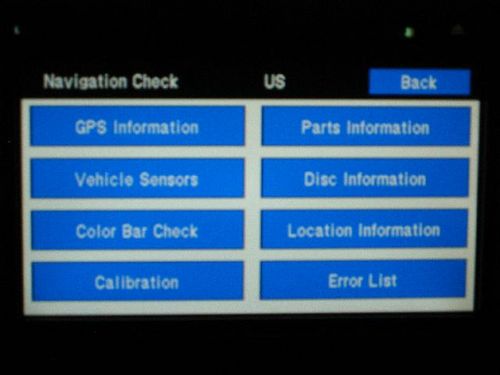

Submenus as follows...

GPS Information Screen:
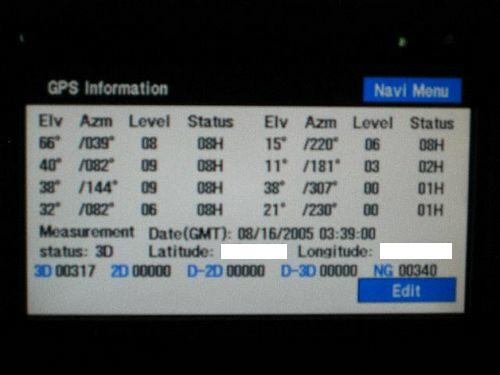
I did not dare press Edit, as I did not want to risk mucking things up! Also, it would appear that the TNR is capable of pulling in at least up to 8 satellites at once; and might even be capable of pulling in a Differential GPS signal, based on the "D-3D" representation at the bottom of the screen.

Vehicle Sensors Screen:

Maybe I should have this particular screen up when I'm driving so I can see what kind of data is being received by the TNR.

Color Bar Check Screen:


Parts Information Screen:


Disc Information Screen:


Location Information Screen:


Error List:


Navigation Version Info:


I did not include a snapshot of the Calibration Screen, as it is for calibrating the touchscreen sensor points; after you go in there and (re)calibrate the touch sensors (screen will show a "+" graphic at various points on the screen for you to touch), the TNR will save the touchscreen calibration to memory.

Last edited by tonytone; 08-16-2005 at 03:29 PM.
Reply With Quote
  #2  
Old 10-17-2005, 04:57 PM
the blur the blur is offline
AF Enthusiast
 
Join Date: Dec 2003
Posts: 186
Thanks: 0
Thanked 0 Times in 0 Posts
How did you get there !!!!!!
the geek in me wants to know !!!!

the dealer just installed an 06 nav in my 03.
no joystick to scroll !!!!!!
Reply With Quote
  #3  
Old 10-17-2005, 06:45 PM
tonytone tonytone is offline
AF Enthusiast
Thread starter
 
Join Date: Jan 2004
Posts: 355
Thanks: 0
Thanked 0 Times in 0 Posts
Re: TNR Diagnostics Menu

Quote:
Originally Posted by the blur
How did you get there !!!!!!
the geek in me wants to know !!!!

the dealer just installed an 06 nav in my 03.
no joystick to scroll !!!!!!
You can't figure out how to scroll on the touchscreen nav, and you call yourself a "geek"? j/k!

How to get there: Press "Nav Rpt" button, then press and hold "Config" button until the diagnostics screen appears (about 10 seconds). It goes w/o saying of course that you mess around with the various options at your own risk...
Reply With Quote
  #4  
Old 10-17-2005, 07:23 PM
the blur the blur is offline
AF Enthusiast
 
Join Date: Dec 2003
Posts: 186
Thanks: 0
Thanked 0 Times in 0 Posts
mr. geek,
what exactly are the benifits of getting the lastest CD release, besides the lastest exit # changes?

my dealer didn't know what the differences are between ver 1 and version 4.1. I was lucky enough to get an 06 unit, but they wouldn't give me a new disk.
Reply With Quote
  #5  
Old 10-18-2005, 02:58 PM
tonytone tonytone is offline
AF Enthusiast
Thread starter
 
Join Date: Jan 2004
Posts: 355
Thanks: 0
Thanked 0 Times in 0 Posts
Re: TNR Diagnostics Menu

Quote:
Originally Posted by the blur
mr. geek,
what exactly are the benifits of getting the lastest CD release, besides the lastest exit # changes?

my dealer didn't know what the differences are between ver 1 and version 4.1. I was lucky enough to get an 06 unit, but they wouldn't give me a new disk.
No one really knows exactly what firmware-related stuff got improved/changed from v1 to v4, but FWIW--v2 didn't even have most of my entire subdivision mapped out, hence my decision to upgrade to v3.
Reply With Quote
 
Reply

POST REPLY TO THIS THREAD

Go Back   Automotive Forums Car Chat > GMC > Yukon


Posting Rules
You may not post new threads
You may not post replies
You may not post attachments
You may not edit your posts

BB code is On
Smilies are On
[IMG] code is On
HTML code is Off


All times are GMT -5. The time now is 03:54 AM.

Community Participation Guidelines | How to use your User Control Panel

Powered by: vBulletin | Copyright Jelsoft Enterprises Ltd.
 
 
no new posts


