|
| Search | Car Forums | Gallery | Articles | Helper | Air Dried Fresh Beef Dog Food | IgorSushko.com | Corporate |
|
|||||||
| COMPLETELY off-topic Talk about anything other than cars. But you can't be mad and angry in this forum! |
 |
 Show Printable Version | Show Printable Version |  Subscribe to this Thread
|
|
|
Thread Tools |
|
#1
 09-11-2004, 08:34 AM
|
||||
|
||||
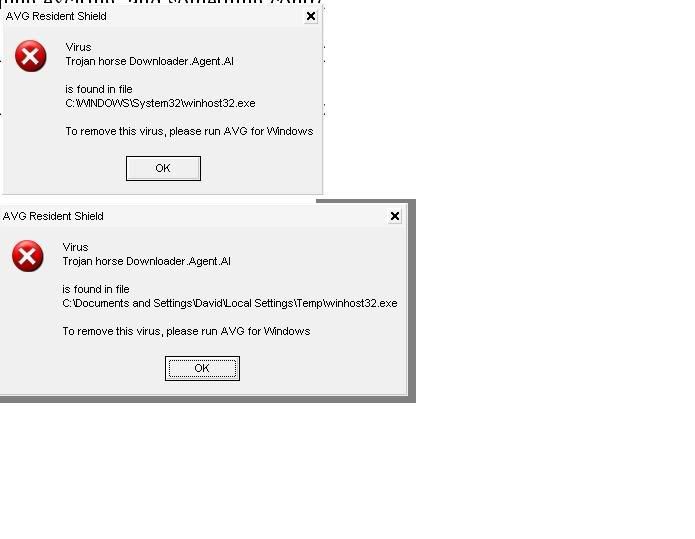
 A virus that won't go away!
I've deleted it, washed it, googled it, wraped it, bleached it, and still, the fucker comes back, and it's pissing me off
it's called "winhost32.exe" and there are three (3) of them on my computer. One in c:\windows\system32 the other in admin, and my own folders in the documents and setting folder in C drive (win XP home) I've booted up in safe mode, deleted the asshole, and did a wash of my computer, I've done over 15 Spybot + adaware (uptodate) cheaks (combined), and still, this asshole is on my goddamn computer. I also have a rundll32.exe that keeps opening flash adds when I visit some sites, one being www.mysongbook.com which does it all the time. I can either close the add, or, if I have my zonealarm firewall running, I have to alt+crt+del and end the fucker. I've deleted it a few times, but that thing keeps coming back, and I do all my deletions in SAFE MODE, as normal mode doesn't seem to work (either) 
|
|
#2
09-12-2004, 03:18 PM
|
||||
|
||||
|
Something you're running keeps reinstalling the application. Search your registry for entries under that name. Take a look at what your application is running under hkey_current_user/software/microsoft/windows/currentversion/run You probably have something in there that doesn't belong.
If you're running Kazaa or the like, then all bets are off. Spyware heaven.
__________________
Resistance Is Futile (If < 1ohm)
|
|
#3
09-12-2004, 11:17 PM
|
||||
|
||||
|
Re: A virus that won't go away!
http://forums.techguy.org/archive/in.../t-215905.html
full instructions including removal tool downloads.
|
|
#4
09-12-2004, 11:36 PM
|
||||
|
||||
|
Re: A virus that won't go away!
I have CW shredder, and HijackThis! and have used them numerous times over the period of about two months, winhost32.exe is still on my system.
Thanks for the link though, I'll try those, instructions And Thanks yogs for the regedit thing.
|
|
#5
09-16-2004, 09:23 AM
|
||||
|
||||
|
Re: A virus that won't go away!
Some ad-ware programs are notorious for installing programs. Ad-Aware and Spybot are good programs, but they don't catch full program installations, mostly just add-ons to your registry and IE. Go to your Control Panel and Add/Remove Programs. Look for any programs that look suspicious. Some of the more "insistant" ad-ware programs are GAIN, Gator, Wild Tangent, In-Case (or nCase), and a couple others I can't think of at the moment.
Another good idea is to turn of the Windows Messenger service on your machine. A lot of ad-ware can pipe ads through that service. You can do this by going to the Start menu, clicking on Run, and typing in "msconfig". Press enter and you'll enter the Microsoft Config utility. Click the Startup tab at the top, and uncheck "msmsgs". Click OK. Next time Windows starts, it'll give you a dialog box stating you used the msconfig utility. This is normal. Just check the box and click OK so it won't pop up again until you use the utility again. This is also a good place to disable certain programs running on boot like your ad-ware programs that are causing your issues. Just be wary of messing with things in there. If you uncheck the wrong things, Windows may not boot.  Also, after you uncheck "msmsgs", you'll need to disable the service so it doesn't start up on it's own as well. Go into your Control Panel, and open up Administrative Tools. Then open either Computer Management or Services (they both can do what you need to do). I use the Computer Management console personally. From there, click on the "Services and Applications" catagory on the left and then click on "Services." Click on the "Standard" tab on the bottom. Scroll down until you see "Messenger" on the left. Right-click it and click on Properties. Click the Stop button to stop the service. Then under "Startup Type" in the middle, select "Disabled." Click OK and close the window.  Reboot your machine and it'll be disabled. If you don't use the Microsoft Messenger chat program either, it wouldn't hurt to uninstall it. You might also notice your PC may run slightly faster - the Messenger service has a tendancy to bog down the OS somewhat. See if this helps any with the ads and don't forget to look for suspicious programs that may be installed and causing your issues. And if messenger continues to start up at boot and stay running, I have an alternative method to completely uninstall it from Windows.
__________________
 1995 Honda CRX del Sol VTEC Manufactured: Suzuka, Japan Production Sequence #1269 Team Del Sol member #1131 HondaVision: Team Sol Forum - Home of Team Del Sol __________________
|
|
#6
09-23-2004, 03:28 AM
|
||||
|
||||
|
Re: A virus that won't go away!
you think you got it bad with one, lol, i just cleaned my aunts pc last night cause she is computer retarded. 89 Virus' 305 instances of spyware, she wondered why it was being slow <rolls eyes>
what kind of virus scan do you have? i use mcafee, and it seems to be able to delete and get rid of all virus and spyware ive ever encountered. good luck to you.
__________________
Pictures of the Truck
|
|
#7
09-23-2004, 02:46 PM
|
||||
|
||||
|
ZoneAlarm, AD-Aware, and Spybot don't do anything for viruses. You need to get a virus scanner to get rid of a virus. Also, don't uncheck anything is msconfig. Msconfig is a utility for trouble shooting, not disabling things on start-up. If you uncheck things in msconfig and continue to run that way you can cause a memory leak.
My suggestion would be a clean install. Wipe the master boot record, format the hard drive, and then re-install everything. If you don't want to be that drastic download AVGs free anti-virus scanner.
|
|
#8
09-23-2004, 06:31 PM
|
||||
|
||||
|
Re: A virus that won't go away!
Quote:
 That's the first time I've ever heard of that. Not trying to discredit you or anything, I'm just curious. That's the first time I've ever heard of that. Not trying to discredit you or anything, I'm just curious.I've been using msconfig to disable unwanted programs during startup (that don't have an option to turn off) for years across Windows '95 to Windows XP Pro. Hasn't given me any issues yet.
__________________
1995 Honda CRX del Sol VTEC Manufactured: Suzuka, Japan Production Sequence #1269 Team Del Sol member #1131 HondaVision: Team Sol Forum - Home of Team Del Sol __________________
|
|
#9
09-24-2004, 12:18 PM
|
||||
|
||||
|
Re: Re: A virus that won't go away!
Quote:
http://www.microsoft.com/resources/d...nfig_usage.asp http://forums.g4techtv.com/messagevi...hreadid=151380
|
|
#10
09-24-2004, 11:50 PM
|
||||
|
||||
|
Re: A virus that won't go away!
Quote:
|
|
#13
09-27-2004, 01:31 AM
|
||||
|
||||
|
Re: Re: Re: A virus that won't go away!
Quote:
I'll refrain from making the suggestion to others in the future though to protect their OS integrity.
__________________
1995 Honda CRX del Sol VTEC Manufactured: Suzuka, Japan Production Sequence #1269 Team Del Sol member #1131 HondaVision: Team Sol Forum - Home of Team Del Sol __________________
|
|
|
POST REPLY TO THIS THREAD |
 |
|
|