|
| Search | Car Forums | Gallery | Articles | Helper | Air Dried Fresh Beef Dog Food | IgorSushko.com | Corporate |
|
|||||||
| COMPLETELY off-topic Talk about anything other than cars. But you can't be mad and angry in this forum! |
 |
 Show Printable Version | Show Printable Version |  Subscribe to this Thread
|
|
|
Thread Tools |
|
#1
 07-26-2003, 11:02 AM
|
||||
|
||||
|
Removing sound from computer when signing on AOL
Hi, when I dial up for AOL, it's loud as fuck and I really want to get rid of the sound. Anyone know how to do this? Is there a modem setting or something? thanks.
__________________


|
|
#2
07-27-2003, 07:42 AM
|
|||
|
|||
|
What operating system are u running?
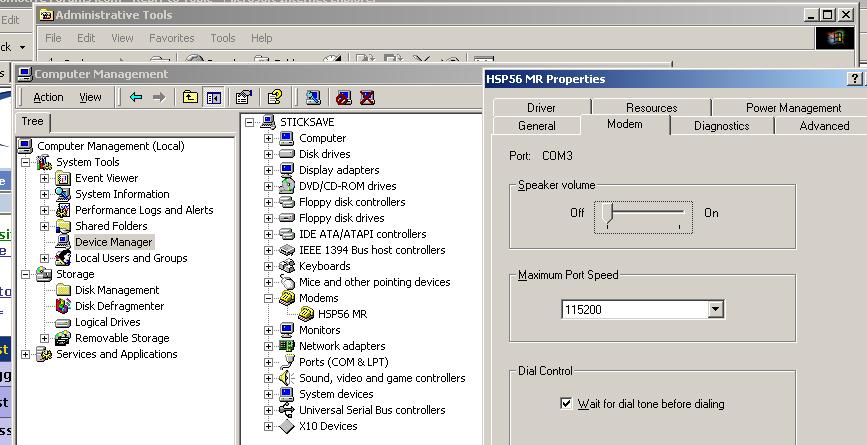
Normally in the windows range of OS under control panel, then modem, there is an option to disable the modem speaker. Just look into there.
|
|
#5
07-27-2003, 10:28 PM
|
|||
|
|||
|
on xp there should be something similar to what was posted above.
just goto the modem section, then select the modem's properties. It'll bring up a menu which u cn disable the sound. I'm unable to produce a screenshot simply because I'm on broadband and don't have a modem installed at all, amazingly reliability over here in Australia is pretty good.
|
|
#6
08-01-2003, 09:17 PM
|
||||
|
||||
|
Quote:
 
|
|
|
POST REPLY TO THIS THREAD |
 |
|
|