

|
| Search | Car Forums | Gallery | Articles | Helper | Air Dried Fresh Beef Dog Food | IgorSushko.com | Corporate |
|
|||||||
| Car Modeling Share your passion for car modeling here! Includes sub-forum for "in progress" and "completed" vehicles. |
 |
 Show Printable Version | Show Printable Version |  Subscribe to this Thread
|
|
|
Thread Tools |
|
#1
 05-12-2013, 09:37 AM
|
|||
|
|||
|
Custom decals suffer dissolving colors when applied
I have created some custom decals and printed them on Experts-Choice decal film using an ink jet printer.
After drying I have applied two coats of Microscale Liquid Decal Film using a brush. But... and here is the big but... ... when I soaked the first decal in luke warm water the color of the decal dissolved in parts  . .Can this be because the Liquid Decal Film is too thin? I applied another layer of it to be sure, but perhaps someone here has experienced the same problem in the past? Cheers, J. 
|
|
#3
05-12-2013, 11:00 AM
|
|||
|
|||
|
Re: Custom decals suffer dissolving colors when applied
Quote:
|
|
#4
05-12-2013, 11:08 AM
|
||||
|
||||
|
Re: Custom decals suffer dissolving colors when applied
I usually apply 2 coats of the Microscale product and they are fine. You have to be very careful when cutting them out, because the slightest damage to the Microscale film will mean that the colours will bleed out into the water. Really trim them carefully and make sure you don't cut into the colours. If you can print them on a colour laser printer you don't need to seal them at all and you can dip them into water with no colour bleed, just a thought...
__________________
Steve Noble
|
| The Following User Says Thank You to stevenoble For This Useful Post: | ||
Johan_SWE (05-12-2013)
| ||
|
#5
05-12-2013, 11:27 AM
|
|||
|
|||
|
Re: Custom decals suffer dissolving colors when applied
I might have touched the surface with a tool while sliding the decal in place, but it seems like the color broke off randomly in the middle of the decal.
Will give it another go tomorrow 
|
|
#6
05-12-2013, 11:35 AM
|
|||
|
|||
|
Re: Custom decals suffer dissolving colors when applied
I use Testors glosscoat. Spray on 2-3 light coats. Brushing anything over inkjet decals usually isn't a good idea.
|
|
#7
05-12-2013, 01:16 PM
|
||||
|
||||
|
Re: Custom decals suffer dissolving colors when applied
Quote:
__________________
Steve Noble
|
|
#8
05-12-2013, 03:49 PM
|
|||
|
|||
|
Re: Custom decals suffer dissolving colors when applied
I've been making own decals with an inkjet printer for nearly 10 years.
Use a half-decent polyurethane varnish spray can. In the UK we have a brand called 'Plastikote'. It NEVER fails and I only ever spray ONE coat of the stuff. Not only that, but once dry, I can use Microsol and Microset with it - no trouble. Method: Print the decals at 'photo' quality. Allow to dry AT LEAST 24 hours - preferably in an airing cupboard, or propped up over a central heating radiator. Spray ONE even coat of varnish - gloss is best. Allow to dry another 24 hours. Use....... Here's a Revell Ferrari I converted to the 2010 Lotus using home made decals. 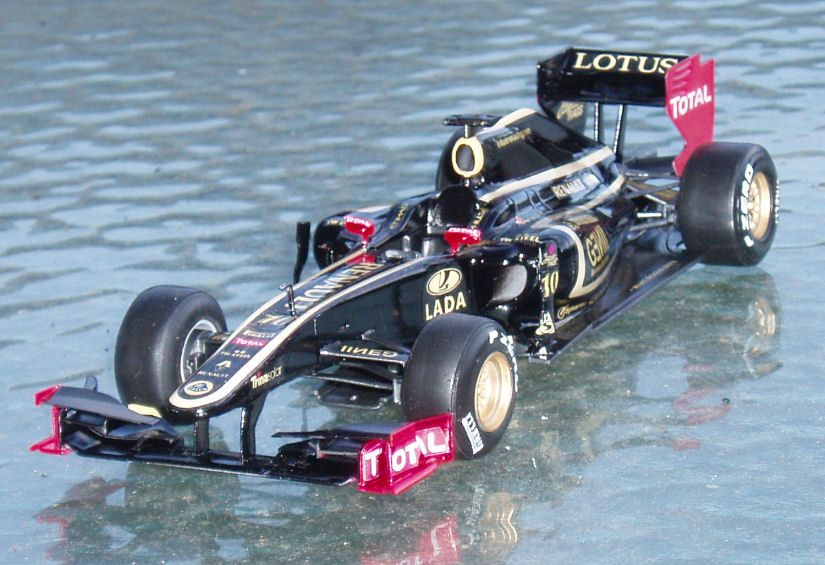 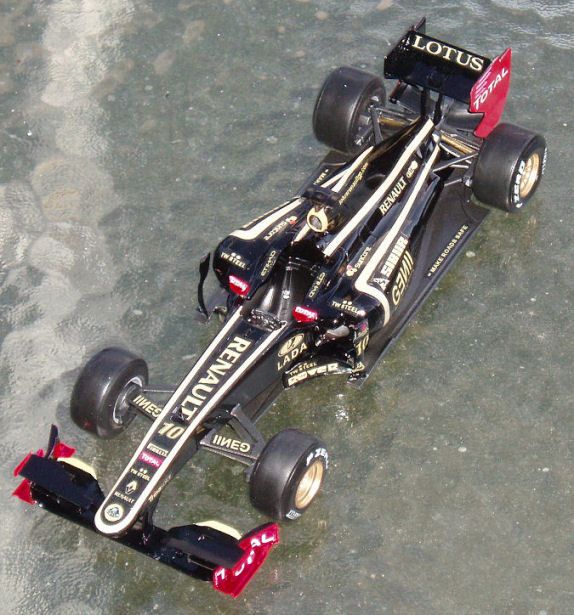 Roy.
|
| The Following User Says Thank You to roymattblack For This Useful Post: | ||
Johan_SWE (05-13-2013)
| ||
|
#9
05-12-2013, 04:56 PM
|
||||
|
||||
|
Re: Custom decals suffer dissolving colors when applied
my tip Johan:
after u printed the decal on BM sheet leave it resting for some hours, then apply a very light coat of tamiya ts-13 and let it dry too. U should apply some very light passages of ts-13 that coming dry will allow u to apply the final, heavier heavy passage (ok, never too heavy, but when paint from printer is dry u can also be quite wet..). It should work with mostly all enamel based NOT water soluble clear coatings. real limit of BM sheet is they come quite thick and react strange with softners on curved surfaces. I did several times, it works great.Try it, is quite easy
__________________
Paolo - LoveGT40 Modelworks website www.alsoldatino.com my YT channel : https://www.youtube.com/channel/UCIp..._as=subscriber FB: https://www.facebook.com/alsoldatino
|
| The Following User Says Thank You to lovegt40 For This Useful Post: | ||
Johan_SWE (05-13-2013)
| ||
|
#10
05-13-2013, 05:09 AM
|
|||
|
|||
|
Re: Custom decals suffer dissolving colors when applied
Quote:
You should not leave the decal in water for long. Usually I just let it float at the surface of the water for a few seconds and then put it on a cloth to soak up excess water. In that way the decal doesn't really get wet all the way through, but within a minute or so I can slide it of the paper and onto the model.
|
| The Following User Says Thank You to hsmed For This Useful Post: | ||
Johan_SWE (05-13-2013)
| ||
|
|
POST REPLY TO THIS THREAD |
 |
|
|


