

|
| Search | Car Forums | Gallery | Articles | Helper | Air Dried Fresh Beef Dog Food | IgorSushko.com | Corporate |
|
|||||||
| Graphic Manipulation Post and discuss different automotive art works- photoshopped, 3d graphics, and hand-drawn. |
 |
 Show Printable Version | Show Printable Version |  Subscribe to this Thread
|
|
|
Thread Tools |
|
#1
 05-11-2003, 02:50 PM
|
||||
|
||||
|
Make the Perfect Reflections and Tints
I made some tutorials on how to make the perfect reflections and tints. These are MY methods for making reflections and tints, meaning they aren't they right way or the only way. I used photoshop 6 so the tutorial applies to photoshop 6 and probly 7, i'm not sure about the others.
Anyway, a lot of people try and make reflections and they look shitty because they are not proportioned. When reflecting cars, you should never highlight the whole car and reflect it unless the car is on a level angle with the camera. for this tutorial I will use this Autoexe Mazda Demio. Notice how the car is not on a level angle, the camera is above the bottom of the car, making a V shaped line. If you would reflect this, the front bumper would be at the opposite angle. So heres how I do it: Starting with the demio:  Select your front wheel. Then hit CTRL+C to copy the wheel, and then CTRL+V to paste it onto a new layer. Make sure that the new wheel layer is selected, click on the EDIT menu on your tool bar. Then select TRANSFORM, then FLIP VERTICAL:  Move the flipped wheel below the original wheel, so that the shadow under the car is between the two rims. Folow the same steps for the back wheel. Once both wheels are reflected, now you need to reflect the body. Select the whole side of the body like so:  The CTRL+C, and CTRL+V to copy the side onto another layer. Again, vertically flip the new layer. Now go to EDIT, TRANSFORM, SKEW. Skew the image until the bottom of both the original and the new layer are parrallel:  Select the front of the car:  And again copy and paste into a new layer, then flip vertically, then skew until the bottoms are parrallel. Now you are finished relflecting the body, but there is still more work to make it appealing. First, we need to eliminate the number of layers to limit confusion. Select the first layer in the layers window and hit CRTL+E until all the layers, excpet the backround, are in one new layer. There is a lot of dead space between the car and it's reflection, so we need to make the shadows under the car. slect the backround layer, then make a new layer between the backround and the reflection. Select the following with the lasso tool:  You can either use the paintbucket tool or the airbrush to make the entire selection black. Then merge the black layer with the relflection layer by hitting CRTL+E. Make sure your dont merge the backround, just merge the top with the middle layer. Now select the reflection/shadow layer and make it blurry:  Blur the image however you like, but not too much so you can't tell it's a car. Then you can play around with the relfection to make it even better looking. I use the distort fucntions like glass and ocean ripple. Heres a final result of the reflection: 

|
|
#2
05-11-2003, 03:02 PM
|
||||
|
||||
|
There are many ways to make windows look tinted. The basic way is to adjust the brightness of the window. I personally think that is too plain and doesnt add anything to the car. This tutorial will show you how to make mirror tints and colored tints.
First, slect the back windows. DONT do the windsheild and side windows at the same time. Select the side windows first. Select the gradient tool, which is where the paintbucket tool is, and selct the black to white gradient:  click the top of the selection and drag a straight line to the bottom of the reflection. You need to play with this a few times before you get it to look correct.  Now you have made a mirror tint. Looks good on dark colored cars but not to great on white or silver. So we will add some color. Go to IMAGE on the toolbar. Then select ADJUST, then HUE/SATURATION.  check the box that says COLORIZE and adjust the color to your liking. I have chosen red:  Now you're done. Here's a chop i did this morning using both the reflection and the window tint. 
|
|
#4
05-11-2003, 07:19 PM
|
|||
|
|||
|
Those are somehelpful tutorials. THanks. I just have one suggestion for the reflection tut. which will make it pefect. You need to fix the spacing in the body. I used the smudge tool to connect it. Refer to the image.
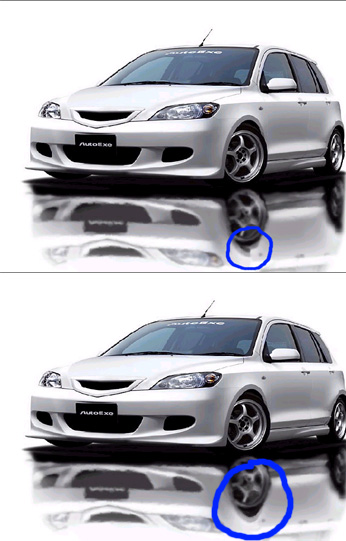
__________________
 05' Civic Si - Tokico D-Specs/Progress Springs/Progress Rear Sway/CorSport Endlinks/Ingalls Torque Dampner/Energy Suspension Motor Mounts/Falken Ziex/HFP Spoiler/RSX Rims
|
|
#5
05-11-2003, 07:20 PM
|
|||
|
|||
|
Almost forgot...BTW what font is that and whered you get it?
__________________
05' Civic Si - Tokico D-Specs/Progress Springs/Progress Rear Sway/CorSport Endlinks/Ingalls Torque Dampner/Energy Suspension Motor Mounts/Falken Ziex/HFP Spoiler/RSX Rims
|
|
#6
05-11-2003, 08:17 PM
|
||||
|
||||
|
http://www.fontsnthings.com/themes/graffiti.html
click on the "subway" font. It won't work for capitals or numbers tho. BTW thanks for pointing out the mistake I realized it but was too lazy to fix it after I posted.
|
|
#7
05-12-2003, 07:46 AM
|
||||
|
||||
|
i think my way looks better, here is a try:
|
|
#8
05-12-2003, 12:42 PM
|
||||
|
||||
|
ran, your is alright, but his is better looking, more realistic.
ran in your reflection the shadow underneath the front wheels dont match up, and its too clear of a picture to look like a reflection, play around with the ripple or wave filters so it looks like a real reflection more.
__________________
Name: Scott Stable Of Cars I have Owned: 1991 Honda CRX 1990 Oldsmobile Cutlass Supreme 2003 Honda Accord 1998 Chrysler Concorde 2007 Honda Civic 1997 Toyota Camry 1995 Saturn SC2 1996 Ford Taurus 1991 GMC Sierra 2002 Daewoo Leganza 1999 Dodge Ram 2007 Honda CR-V 2003 BMW 325i
|
|
#9
05-12-2003, 06:34 PM
|
||||
|
||||
|
Quote:
|
|
#10
05-13-2003, 06:33 AM
|
||||
|
||||

Quote:

|
|
#11
05-13-2003, 06:34 AM
|
||||
|
||||
|
Quote:

|
|
|
POST REPLY TO THIS THREAD |
 |
|
|





