-
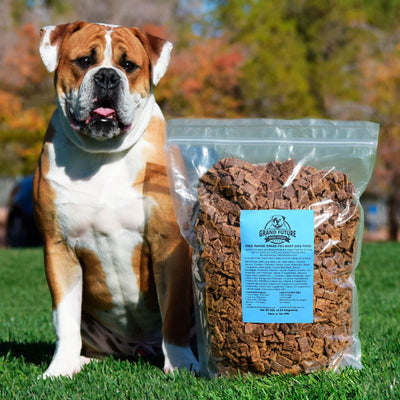
Grand Future Air Dried Fresh Beef Dog Food
Air Dried Dog Food | Fresh Beef

Carnivore Diet for Dogs

Go Back   Automotive Forums Car Chat > Pontiac > Grand Prix
Register FAQ Community
Reply Show Printable Version Show Printable Version | Subscription Subscribe to this Thread
 
Thread Tools
  #1  
Old 03-19-2005, 01:46 AM
adblink182 adblink182 is offline
AF Enthusiast
 
Join Date: Feb 2005
Posts: 153
Thanks: 0
Thanked 0 Times in 0 Posts
Disable the DRL

ok I followed the simple step of disabling my Daytime running lights from the steps posted awhile back...and basically all you had to do was pull the electrical plug that is found on the drivers side where the fuse panel normally is

I did that and it worked no problem. Except now my fog lights dont work?....anyone try disabling their DRL's and having the same problem?

what I will just end up doing is installing a switch just before that connector, so I can just turn it on (basically reconnectiong it) at night so I have the fog lights back cause with my new headlight covers I really need them, lol
Reply With Quote
  #2  
Old 03-19-2005, 06:11 AM
carnutcass's Avatar
carnutcass carnutcass is offline
AF Enthusiast
 
Join Date: Jun 2003
Posts: 577
Thanks: 0
Thanked 0 Times in 0 Posts
What year is your car? I've never heardof someone having trouble with fog lights afterdisabling the DRLs.
Reply With Quote
  #3  
Old 03-19-2005, 07:10 AM
adblink182 adblink182 is offline
AF Enthusiast
Thread starter
 
Join Date: Feb 2005
Posts: 153
Thanks: 0
Thanked 0 Times in 0 Posts
Re: Disable the DRL

99 gt
Reply With Quote
  #4  
Old 03-19-2005, 08:30 AM
Ripn12s's Avatar
Ripn12s Ripn12s is offline
AF Enthusiast
 
Join Date: Jul 2003
Posts: 1,206
Thanks: 0
Thanked 0 Times in 0 Posts
Send a message via AIM to Ripn12s
Re: Disable the DRL

Did u remove the dash panel and forget to plug the fogs back in???
__________________
Reply With Quote
  #5  
Old 03-19-2005, 09:14 AM
adblink182 adblink182 is offline
AF Enthusiast
Thread starter
 
Join Date: Feb 2005
Posts: 153
Thanks: 0
Thanked 0 Times in 0 Posts
nope, I just removed the small side door to access the connector. I didnt remove the dash

I actually couldnt remove the connector (couldnt get my hand in there to get a good grib) so I just cut the blue/tan wire a few inches from the connector....which is basically the same thing as pulling the connector

I'm going to re-connect the wires later and hopefully it fixes it, if it doesnt, I dunno wtf I'm gonna do

learn how the fog lights are wired up I guess
Reply With Quote
  #6  
Old 03-19-2005, 06:28 PM
Tonyr's Avatar
Tonyr Tonyr is offline
AF Regular
 
Join Date: Jun 2004
Posts: 346
Thanks: 0
Thanked 0 Times in 0 Posts
Re: Disable the DRL

I have a 98 GTP and all I did was pull the fuse from within the glove box. I'm not sure how it is for other years.
Reply With Quote
  #7  
Old 03-19-2005, 08:20 PM
dandigger dandigger is offline
AF Newbie
 
Join Date: May 2004
Posts: 23
Thanks: 0
Thanked 0 Times in 0 Posts
Re: Disable the DRL

yeah, as Tony said, just pull the fuse. I've done that in my 2000 and everything else is running fine.
Reply With Quote
  #8  
Old 03-20-2005, 12:09 AM
adblink182 adblink182 is offline
AF Enthusiast
Thread starter
 
Join Date: Feb 2005
Posts: 153
Thanks: 0
Thanked 0 Times in 0 Posts
Re: Disable the DRL

i think i know what the problem is. A week or so ago I had a stereo installed in my car. I pulled hte dash off (and had to remove the fog lights connector).....what probably happened was the guys who installed it didnt reconnect the fog light connector when they reinstalled the dash. It was just coincidence that I noticed they werent working as soon as I disabled the DRLs.

I'll check it tomorrow

thanks
Reply With Quote
 
Reply

POST REPLY TO THIS THREAD

Go Back   Automotive Forums Car Chat > Pontiac > Grand Prix


Posting Rules
You may not post new threads
You may not post replies
You may not post attachments
You may not edit your posts

BB code is On
Smilies are On
[IMG] code is On
HTML code is Off


All times are GMT -5. The time now is 07:08 PM.

Community Participation Guidelines | How to use your User Control Panel

Powered by: vBulletin | Copyright Jelsoft Enterprises Ltd.
 
 
no new posts